[googlepdf url=”https://wrif.wvsu.edu.ph/files/pdf/cilpibulletin2.pdf” download=”Download” width=”100%” height=”600″]
Author: developers
-
Taga-West Bulletin (Mar-Aug 2020)
[googlepdf url=”https://wrif.wvsu.edu.ph/files/pdf/cilpibulletin1.pdf” download=”Download” width=”100%” height=”600″]
-
Administrative Assistant II
[googlepdf url=”https://wrif.wvsu.edu.ph/files/pdf/jobs/job-AdminAssis.pdf” download=”Download Document” width=”100%” height=”600″]
-
List of Qualified WVSU College of Law Juris Doctor Degree Applicants for Medical Examination
Note: Qualified Applicant should register and attend the
“MENTAL HEALTH AND WELLNESS TRAINING FOR LAW STUDENTS“
The Legal Education Board partners with the Association of Law Students of the Philippines – National(ALSP) for the Mental Health and Wellness Training for Law Students happening on August 15, 2020 via Zoom. This program will provide groundbreaking interactive sessions on mental health awareness and introduces risk factors and warning signs of mental health problems, builds understanding of their impact, and overviews common treatments.
To register, click on the link below:
https://zoom.us/webinar/register/WN_paz6oux8SC2Ef8yo_oo5cg
For more information, email us at trainings@leb.gov.ph
We hope to see you there! Register now.
1 AGUARAS, KIRBY VERDY 2 AVILES, RENE JR. MONSERA 3 BARREDO, STEPHENE SALCEDO 4 BILLIONES, PEARL ANNE THERESE PALMES 5 DE VERA, ROLAND LANLAN 6 DIAZ, ALYSSA JANE CERVAS 7 DUSABAN, CELINE WHAYNE GALLO 8 ERIBAL, RUWI JOY PALMAIRA 9 ESCALERA, RIZZA MAE PALMA 10 ESCANLAR, MAYELL FAITH GALLENERO 11 FAMINIANO, APPLE MARABE 12 GACAYAN, CLYDE BEN ARMONIO 13 GALELE, DARLENE KAYE PEÑAVERDE 14 GENCIANA, CLINT DEO 15 GUILLEM, MIKE GABRIEL GUMACAL 16 GUMBAN, THEDA GRACE SONDIA 17 HORLADOR, L MICHELLI KILAYCO 18 JUANITO, JOHN MARTIN GONZALES 19 LACSAMA, CRYSTAL EUFEMARIE CRESENCIO 20 LEGRIA, MAIDY PETES 21 LLADO, DARRYL BEN ESPEJO 22 LUTERO, APRIL ROSE DE PAULA 23 MAGOTE, ELIEZER NGALONGALAY 24 PANASE, GLORY MAE PINUELA 25 RUEL, PHILIPP CENTENNI LUSAYA 26 SASI, JEZNER RALPH DELA CRUZ 27 SILLA, VANESSA GAYOMA 28 TUTISURA, JOHN BERT CALLANGA 29 UNDAR, HANNAH JOY BANTOLIO 30 YAP, EDSON CHASE HECHANOVA Waitlisted Applicants 31 SARROSA, KRISTELLE JOY SALVADOR 32 ARSENAL, DARLENE JOY PREGUA 33 GUILLANO, JANNESSAH TALE 34 ENAYA, ZYRA BIENNA ESCOBAÑEZ 35 RUBINO, LUCIANA GREGORIO -
Qualified Applicants for the Initial College of Law Interview on August 6, 7, 10, 11, & 12, 2020
CONGRATULATIONS to the following applicants who are qualified for the Initial College of Law Interview on August 6, 7, 10, 11, & 12, 2020, at the VPAA Conference Room.
SCHEDULE OF INTERVIEW TIME OF INTERVIEW NAME OF APPLICANTS AUGUST 6, 2020 1:30 – 4:30 PM AGUARAS, KIRBY VERDY AUGUST 6, 2020 1:30 – 4:30 PM ALBAÑA, EDGAR ALAN BALTAR AUGUST 6, 2020 1:30 – 4:30 PM ALGER, FRANCIS ISMAAEL MAGCANAM AUGUST 6, 2020 1:30 – 4:30 PM ARSENAL, DARLENE JOY PREGUA AUGUST 6, 2020 1:30 – 4:30 PM AVILES, RENE JR. MONSERA AUGUST 6, 2020 1:30 – 4:30 PM BACALANMO, ELLINE AUGUST 6, 2020 1:30 – 4:30 PM BARREDO, STEPHENE SALCEDO AUGUST 6, 2020 1:30 – 4:30 PM BILLIONES, PEARL ANNE THERESE PALMES AUGUST 6, 2020 1:30 – 4:30 PM CELIS, EMMANUEL JAMES GENER AUGUST 6, 2020 1:30 – 4:30 PM CORDERO, ANDREA AGUILAR AUGUST 7, 2020 1:30 – 4:30 PM DEFENSOR, JESSIRENE MAPA AUGUST 7, 2020 1:30 – 4:30 PM DEGALA, KIMBERLY DE ASIS AUGUST 7, 2020 1:30 – 4:30 PM DE VERA, ROLAND LANLAN AUGUST 7, 2020 1:30 – 4:30 PM DIAZ, ALYSSA JANE CERVAS AUGUST 7, 2020 1:30 – 4:30 PM DUSABAN, CELINE WHAYNE GALLO AUGUST 7, 2020 1:30 – 4:30 PM ENAYA, ZYRA BIENNA ESCOBAÑEZ AUGUST 7, 2020 1:30 – 4:30 PM ERIBAL, RUWI JOY PALMAIRA AUGUST 7, 2020 1:30 – 4:30 PM ESCALERA, RIZZA MAE PALMA AUGUST 7, 2020 1:30 – 4:30 PM ESCANLAR, MAYELL FAITH GALLENERO AUGUST 7, 2020 1:30 – 4:30 PM ESCAÑO, EMMALYN MALCONTENTO AUGUST 10, 2020 8:30-11:30 AM FAMINIANO, APPLE MARABE AUGUST 10, 2020 8:30-11:30 AM FLORIN, DOREEN GRACE LARANJO AUGUST 10, 2020 8:30-11:30 AM GACAYAN, CLYDE BEN ARMONIO AUGUST 10, 2020 8:30-11:30 AM GALELE, DARLENE KAYE PEÑAVERDE AUGUST 10, 2020 8:30-11:30 AM GENCIANA, CLINT DEO AUGUST 10, 2020 8:30-11:30 AM GUILLANO, JANNESSAH TALE AUGUST 10, 2020 8:30-11:30 AM GUILLEM, MIKE GABRIEL GUMACAL AUGUST 10, 2020 8:30-11:30 AM GUMBAN, THEDA GRACE SONDIA AUGUST 10, 2020 8:30-11:30 AM HORLADOR, L MICHELLI KILAYCO AUGUST 10, 2020 8:30-11:30 AM JACOMILLE, MARIELLE THERESE AUGUST 11, 2020 8:30-11:30 AM JUANITO, JOHN MARTIN GONZALES AUGUST 11, 2020 8:30-11:30 AM LACSAMA, CRYSTAL EUFEMARIE CRESENCIO AUGUST 11, 2020 8:30-11:30 AM LEGARIO, MARA DAYANARA LATORZA AUGUST 11, 2020 8:30-11:30 AM LEGRIA, MAIDY PETES AUGUST 11, 2020 8:30-11:30 AM LLADO, DARRYL BEN ESPEJO AUGUST 11, 2020 8:30-11:30 AM LUTERO, APRIL ROSE DE PAULA AUGUST 11, 2020 8:30-11:30 AM MAGOTE, ELIEZER NGALONGALAY AUGUST 11, 2020 8:30-11:30 AM PANASE, GLORY MAE PINUELA AUGUST 11, 2020 8:30-11:30 AM RUBINO, LUCIANA GREGORIO AUGUST 11, 2020 8:30-11:30 AM RUEL, PHILIPP CENTENNI LUSAYA AUGUST 12, 2020 8:30-11:30 AM SADSAD, MARK JERALD SAINZ AUGUST 12, 2020 8:30-11:30 AM SARROSA, KRISTELLE JOY SALVADOR AUGUST 12, 2020 8:30-11:30 AM SASI, JEZNER RALPH DELA CRUZ AUGUST 12, 2020 8:30-11:30 AM SILLA, VANESSA GAYOMA AUGUST 12, 2020 8:30-11:30 AM TUTISURA, JOHN BERT CALLANGA AUGUST 12, 2020 8:30-11:30 AM UNDAR, HANNAH JOY BANTOLIO AUGUST 12, 2020 8:30-11:30 AM YAP, EDSON CHASE HECHANOVA -
List of Qualified Applicants for the Juris Doctor Program Exam
Good Day!
This is from the WVSU College of Law Admissions Committee.
This is to confirm that you are qualified to take the exam on August 2, 2020, 8:00 AM to 12:00 NN at the WVSU University Learning Resource Center (ULRC – Main Library).Kindly bring the following: black ballpen, No. 2 pencils, eraser, and the exact amount of P300.00 for the admission test. Write your name, email address and contact number in a 2 x 3 – inch piece of paper, and staple it to the P300.00. No exchange of money should take place. The use of cellular phone is prohibited and should be put in silent mode and kept in your bag. All personal belongings will be placed in the front row of your assigned examination room. No wearing of shorts, sleeveless or slippers. Please wear masks and face shields, bring your own alcohol and observe social distancing at all times.
Please present your ID at the entrance gate on August 2, 2020.
Good luck in your examination.
Name Room 1 ADIN, AMELIA FE GALIA Ground Floor – Undergraduate Thesis Room 2 ADVINCULA, ARIEL CARPIO Ground Floor – Undergraduate Thesis Room 3 AGUARAS, KIRBY VERDY Ground Floor – Undergraduate Thesis Room 4 ALBAÑA, EDGAR ALAN BALTAR Ground Floor – Undergraduate Thesis Room 5 ALGER, FRANCIS ISMAAEL MAGCANAM Ground Floor – Undergraduate Thesis Room 6 ANIMAS, PAUL JOHN GUILLER Ground Floor – Undergraduate Thesis Room 7 APACHICHA, NOLI CASTILLANO Ground Floor – Undergraduate Thesis Room 8 ARIBAS, CHRISTIAN JOY DE LA CRUZ Ground Floor – Undergraduate Thesis Room 9 ARSENAL, DARLENE JOY PREGUA Ground Floor – Undergraduate Thesis Room 10 AVILES, RENE JR. MONSERA Ground Floor – Undergraduate Thesis Room 11 AZARRAGA, YSABEL LOIS ADAME Ground Floor – Undergraduate Thesis Room 12 BACALANMO, ELLINE Ground Floor – Undergraduate Thesis Room 13 BARREDO, STEPHENE SALCEDO Ground Floor – Undergraduate Thesis Room 14 BASAL, LEO BARRIDO Ground Floor – Undergraduate Thesis Room 15 BASILISCO, JOY BRAVO Ground Floor – Undergraduate Thesis Room 16 BAYLON, JOLLY PEDREGOSA Ground Floor – Undergraduate Thesis Room 17 BILLIONES, PEARL ANNE THERESE PALMES Ground Floor – Undergraduate Thesis Room 18 CALAPATE, JERALD JEAN CALDOSA Ground Floor – Undergraduate Thesis Room 19 CASTRO, KENNETH CHRISTIAN CARO Ground Floor – Undergraduate Thesis Room 20 CELIS, EMMANUEL JAMES GENER Ground Floor – Undergraduate Thesis Room 21 CORDERO, ANDREA AGUILAR Ground Floor – Undergraduate Thesis Room 22 CORILLO, JV LEOMAR Ground Floor – Undergraduate Thesis Room 23 DEFENSOR, JESSIRENE MAPA Ground Floor – Undergraduate Thesis Room 24 DEGALA, KIMBERLY DE ASIS Ground Floor – Undergraduate Thesis Room 25 DELA ROSA, MARY JEA HEAVEN CAMPOS Ground Floor – Undergraduate Thesis Room 26 DELFIN, NINO MIKO LOPEZ Ground Floor – Reference Section 27 DEVERA, GERALD RIVAS Ground Floor – Reference Section 28 DE VERA, ROLAND LANLAN Ground Floor – Reference Section 29 DIAZ, ALYSSA JANE CERVAS Ground Floor – Reference Section 30 DUSABAN, CELINE WHAYNE GALLO Ground Floor – Reference Section 31 ENAYA, ZYRA BIENNA ESCOBAÑEZ Ground Floor – Reference Section 32 ERIBAL, RUWI JOY PALMAIRA Ground Floor – Reference Section 33 ESCALERA, RIZZA MAE PALMA Ground Floor – Reference Section 34 ESCANLAR, MAYELL FAITH GALLENERO Ground Floor – Reference Section 35 ESCAÑO, EMMALYN MALCONTENTO Ground Floor – Reference Section 36 FADUGA, PETER JOUSHUA FORTIT Ground Floor – Reference Section 37 FAMINIANO, APPLE MARABE Ground Floor – Reference Section 38 FLORIN, DOREEN GRACE LARANJO Ground Floor – Reference Section 39 FRUTAS, EMERITO JR. BERGADO Ground Floor – Reference Section 40 GACAYAN, CLYDE BEN ARMONIO Ground Floor – Reference Section 41 GALELE, DARLENE KAYE PEÑAVERDE Ground Floor – Reference Section 42 GARCIA, CRISTINE MARIE CABANA Ground Floor – Reference Section 43 GEMORA, MARY ANN FERNANDEZ Ground Floor – Reference Section 44 GENCIANA, CLINT DEO Ground Floor – Reference Section 45 GEPOLONGCA, JOHN HENRY TACLUYAN Ground Floor – Reference Section 46 GONZALES, LOUVELLE JANGAYO Ground Floor – Reference Section 47 GUILLANO, JANNESSAH TALE 2nd Floor – Readers’ Services Section 48 GUILLEM, MIKE GABRIEL GUMACAL 2nd Floor – Readers’ Services Section 49 GUMBAN, THEDA GRACE SONDIA 2nd Floor – Readers’ Services Section 50 GUZMAN, JEMIMA VILLAR 2nd Floor – Readers’ Services Section 52 HORLADOR, L MICHELLI KILAYCO 2nd Floor – Readers’ Services Section 53 JACOMILLE, MARIELLE THERESE 2nd Floor – Readers’ Services Section 54 JUANITO, JOHN MARTIN GONZALES 2nd Floor – Readers’ Services Section 55 LACSAMA, CRYSTAL EUFEMARIE CRESENCIO 2nd Floor – Readers’ Services Section 56 LEE, STEFANY OBRERO 2nd Floor – Readers’ Services Section 57 LEGARIO, MARA DAYANARA LATORZA 2nd Floor – Readers’ Services Section 58 LEGRIA, MAIDY PETES 2nd Floor – Readers’ Services Section 59 LELIS, NIZZALYN ORDOYO 2nd Floor – Readers’ Services Section 60 LLADO, DARRYL BEN ESPEJO 2nd Floor – Readers’ Services Section 61 LUNASCO, RUSIELJS GARCIA 2nd Floor – Readers’ Services Section 62 LUTERO, APRIL ROSE DE PAULA 2nd Floor – Readers’ Services Section 63 MACUHA, KARLA MAE AUSA 2nd Floor – Readers’ Services Section 64 MAGOTE, ELIEZER NGALONGALAY 2nd Floor – Readers’ Services Section 65 MARISTELA, MARK JEZREL NOBLEZA 2nd Floor – Readers’ Services Section 66 MARTINEZ, RODOLF APOLLOON GEMORA 2nd Floor – Readers’ Services Section 67 MOLEJONA, NIEL JR. ROTE 2nd Floor – Readers’ Services Section 68 PADILLA, KRISTIAN PIO LOPEZ 2nd Floor – Readers’ Services Section 69 PIAMONTE, ERLZE MARIE JULLEZA 2nd Floor – Readers’ Services Section 70 PAGAYON, ALESSIAH SUELO 2nd Floor – Readers’ Services Section 71 PANASE, GLORY MAE PINUELA 2nd Floor – Readers’ Services Section 72 RAMOS, LORD JEMARIE 2nd Floor – Readers’ Services Section 73 ROLDAN, SEFANIAH GABRIELLE MATILLANO 2nd Floor – Readers’ Services Section 74 RUBINO, LUCIANA GREGORIO 2nd Floor – Readers’ Services Section 75 RUEL, PHILIPP CENTENNI LUSAYA 2nd Floor – Readers’ Services Section 76 SADSAD, MARK JERALD SAINZ 2nd Floor – Readers’ Services Section 77 SAMSON, CHRISTIAN JOHN PACARDO 2nd Floor – Readers’ Services Section 78 SANTOALIA, RONAN BRENT SARAZA 2nd Floor – Readers’ Services Section 79 SARROSA, KRISTELLE JOY SALVADOR 2nd Floor – Readers’ Services Section 80 SASI, JEZNER RALPH DELA CRUZ 2nd Floor – Readers’ Services Section 81 SIALSA, LYNDEE JOY 2nd Floor – Readers’ Services Section 82 SILLA, VANESSA GAYOMA 2nd Floor – Readers’ Services Section 83 SUGANOG, CRYSTAL DAWN FERRER 2nd Floor – Readers’ Services Section 84 TAJANAN, GILIAN 2nd Floor – Readers’ Services Section 85 TORMON, KIM HARVEY YNIEGO 2nd Floor – Readers’ Services Section 86 TUTISURA, JOHN BERT CALLANGA 2nd Floor – Readers’ Services Section 87 UNDAR, HANNAH JOY BANTOLIO 2nd Floor – Readers’ Services Section 88 UNICO, NELLYGRACE PANES 2nd Floor – Readers’ Services Section 89 VERA CRUZ, WILCHELM VILLANUEVA 2nd Floor – Readers’ Services Section 90 VILLA, NATALIE NICOLE LEDESMA 2nd Floor – Readers’ Services Section 91 VILLANUEVA, ARNEL PARCON 2nd Floor – Readers’ Services Section 92 VILLANUEVA, MA. PATRICIA LOUISE ALIPAT 2nd Floor – Readers’ Services Section 93 YAP, EDSON CHASE HECHANOVA 2nd Floor – Readers’ Services Section 94 YULO, ANGELA MICHAELA REYANA 2nd Floor – Readers’ Services Section -
GENERAL GUIDELINES OF ONLINE ENROLLMENT
GENERAL GUIDELINES OF ONLINE ENROLLMENT FOR NEW STUDENTS:
- Go to http://iuis.wvsu.edu.ph/aims/applicants using your Applicant Number.
- Parent or guardian of students from the Integrated Laboratory School (ILS) is allowed to login on behalf of his/her child. The student’s IUIS account will be provided by the ILS Director’s Office.
- Make sure that your personal information are complete, updated and correct. Otherwise, you cannot proceed to Enrollment Confirmation.
- Download and fill-out applicable Scholarship Form/s.
- Follow the procedure on how to upload the scholarship form/s. The uploaded form/s shall be reviewed and verified by the OSA Scholarship Coordinator. You cannot proceed if you failed to submit/upload the copy of scholarship form/s.
- For undergraduate students, download and read the Affidavit of Undertaking for the Learning Resource Packet (LRP).
- Assessment of fees can be paid through the Cashier’s Office using Ticketon Online facility, SM Bills payment centers or any of our authorized banks (DBP & Land Bank of the Phils.)
- Review all information and requirements BEFORE YOU SUBMIT THE ENROLLMENT CONFIRMATION. Changes or updating of information will not be accepted once you have submitted the enrollment confirmation.
- All notification emails will be directed to your personal email account or IUIS student account. Check regularly your emails for some important reminders/instructions from your respective college or other units.
- All downloadable forms and original copies of entrance credentials shall be submitted on the scheduled dates.
GENERAL GUIDELINES OF ONLINE ENROLLMENT FOR CONTINUING STUDENTS (including graduates of WVSU SHS, Undergraduate and Graduate Programs with existing IUIS Account enrolling as new student in a higher degree program)
- Go to http://iuis.wvsu.edu.ph/aims/students using your WVSU Student ID number.
- Parent or guardian of students from the Integrated Laboratory School (ILS) is allowed to login on behalf of his/her child. The student’s IUIS account will be provided by the ILS Director’s Office.
- Make sure that your personal information are complete, updated and correct. Otherwise, you cannot proceed to Enrollment Confirmation.
- Download and fill-out applicable Scholarship Form.
- Follow the procedure on how to upload the scholarship form. The uploaded form/s shall be reviewed and verified by the OSA Scholarship Coordinator. You cannot proceed if you failed to submit/upload the copy of scholarship form/s.
- Undergraduate students shall download and read the Affidavit of Undertaking for the Learning Resource Packet (LRP).
- Assessment of fees can be paid through the Cashier’s Office using Ticketon Online facility, SM Bills payment centers or any of our authorized banks (DBP & Land Bank of the Phils.)
- Review all information and requirements BEFORE YOU SUBMIT THE ENROLLMENT CONFIRMATION. Changes or updating of information will not be accepted once you have submitted the enrollment confirmation.
- All notification emails will be directed to your personal email account or IUIS student account. Check regularly your emails for important reminders/instructions from your respective college or other units.
- All downloadable forms and other requirements of the College shall be submitted on the scheduled dates.
IUIS Enrollment Procedure for Continuing Students
Please note before you begin to avoid problems with your Enrollment Confirmation:
1. Make sure that your information in the Enrollment Confirmation fields is complete,
updated, and correct. If not, you can go back to your Personal Information and
update that information.
2. Make sure to fill-up, sign, scan, and upload the scholarship application forms
accordingly. Follow the uploading guidelines to avoid problems.
3. Review your information and other requirements before submitting your
enrollment confirmation. You can no longer change or update once you have
submitted it.
4. The school will evaluate and approved your enrollment confirmation application.
You will receive a notice about your enrollment through your registered email and
student module Messaging feature. You are also advised to login to your Student
module from time to time to receive announcements.Enrollment Confirmation Procedures:
Step 1: Login
1.1 Login to the Student Module
• User Name (Student Number)
• Birth Date
• Password
1.2 Click the Login button to continueStep 2: Personal Information
2.1 After clicking the Agree and Continue button, the system will direct you to the Personal Information submodule to update your information.
2.2 Update your information. Click the Save and Continue button in every tab and click the Update Information button to complete.Step 3: Enrollment Confirmation
3.1 Click the Enrollment Confirmation submodule.
3.2 Read the Enrollment Confirmation guidelines
3.3 Select your terms of payment (Full Payment or Two Payments) in the Mode of Payment dropdown field.
3.4 Select type of scholarship(s) that you are going to apply in the Scholarship and Other Scholarships dropdown fields.
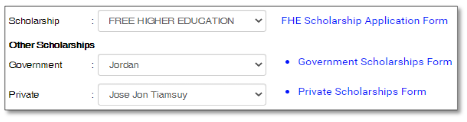
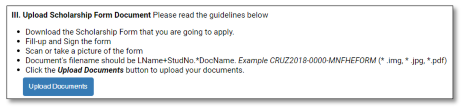
3.5 Click the link to download the Scholarship(s) forms you are applying to. Fill-up, sign and scan or take a clear picture of your signed scholarship form(s). Follow the guidelines on how to upload the document(s) in the Upload Scholarship Form Document field.
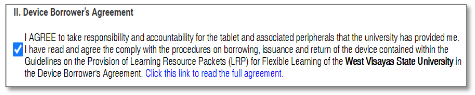
3.6 Click the link to download the Device Borrower’s Agreement. Read and tick the check box in the Device Borrower’s Agreement field if you agree.
3.7 Read the confirmation and tick the check box in the Enrollment Confirmation field if you agree.
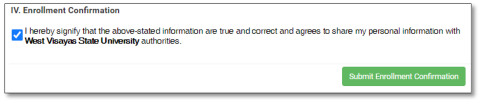
3.8 Click the Submit Enrollment Confirmation button to submit your application.
Enrollment/Registration Procedures:
Step 1: Login
1.3 Login to the Student Module
• User Name (Student Number)
• Birth Date
• Password
1.4 Click the Login button to continueStep 2: Enrollment Message
2.1 Click the Messaging submodule, open and read the Enrollment/Registration and Assessment for School Year 2020-2021 message.
2.2 Click the Close button when you are done.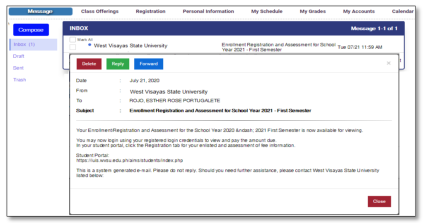
2.2 Click the button

2.3 You will be directed in your Registration and Assessment page. Review the enlisted subjects and your assessment of fees.
2.4 Select your method of payment in the Payment Option field.
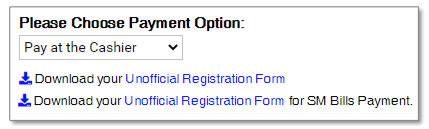
• Pay at the Cashier: if you are going to pay your due amount in the cashier’s
window.
• Pay Online: if you are going to pay through SM Bills and Bank over the
Counter.2.5 Click the Save Registration button and download the Unofficial Registration Form.
• Pay at the Cashier: Download the Unofficial Registration Form.
• Pay Online: Download the Unofficial Registration Form for SM Bills Payment.2.6 Click the Yes, Proceed button to complete your Registration. Pay the amount due.
**If you make a payment through online banking or over the counter bank
payment, upload your proof of payment.1.1 Login to the Student Module
1.2 Click the Upload Deposit Slip submodule
1.3 Click the files/documents from your computer link and click the Upload file button
to upload your bank deposit slip or any proof of payment.
1.4 Click the Upload and Submit button after.***You will be informed through email or messaging once your payment has been
processed. Check your registered email or login to your student module account regularly
to verify the confirmation of your payment and enrollment.Enrollment and Payment Confirmation Procedures:
Step 1: Login
1.1 Login to the Student Module
• User Name (Student Number)
• Birth Date
• Password
1.5 Click the Login button to continueStep 2: Enrollment Message
2.1 Click the Messaging submodule, open and read the message. You will received an Enrollment Confirmation or Enrollment Payment Confirmation once you are officially enrolled.2.2 Click the Close button when you are done.
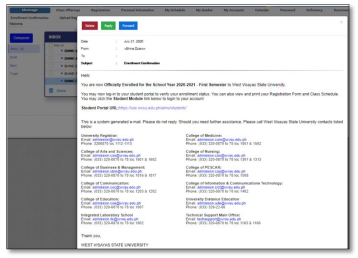
2.3 Click the Registration submodule.
2.4 Click the Generate Certificate of Registration button download your CORIUIS Enrollment Procedure for New Students
Please note before you begin to avoid problems with your Enrollment Confirmation:
1. Make sure that your information in the Enrollment Confirmation fields is complete,
updated, and correct. If not, you can go back to your Personal Information and
update that information.
2. Make sure to fill-up, sign, scan, and upload the scholarship application forms
accordingly. Follow the uploading guidelines to avoid problems.
3. Review your information and other requirements before submitting your
enrollment confirmation. You can no longer change or update once you have
submitted it.
4. The school will evaluate and approved your enrollment confirmation application.
You will receive a notice about your enrollment through your registered email and
student module messaging feature. You are also advised to login to your Applicant
module from time to time to receive announcements and your Registration and
Assessment status.Enrollment Confirmation Procedures:
Step 1: Login
1.1 Login to the Applicant’s Module
• User Name (Applicant Number)
• Password
1.2 Click the Login button to continueStep 2: Personal Information
2.3 After clicking the Agree and Continue button, the system will direct you to the
Personal Information submodule to update your information.2.4 Update your information. Click the Save and Continue button in every tab and click
the Update Information button to complete.Step 3: Enrollment Confirmation
3.1 Click the Enrollment Confirmation submodule.
3.2 Read the Enrollment Confirmation guidelines
3.3 Select your terms of payment (Full Payment or Two Payments) in the Mode of Payment dropdown field.3.4 Select type of scholarship(s) that you are going to apply in the Scholarship and Other Scholarships dropdown fields.
3.5 Click the link to download the Scholarship(s) forms you are applying to. Fill-up, sign and scan or take a clear picture of your signed scholarship form(s). Follow the guidelines on how to upload the document(s) in the Upload Scholarship Form Document field.
3.6 Click the link to download the Device Borrower’s Agreement. Read and tick the check box in the Device Borrower’s Agreement field if you agree.
3.7 Read the confirmation and tick the check box in the Enrollment Confirmation field if you agree.
3.8 Click the Submit Enrollment Confirmation button to submit your application.
Enrollment/Registration Procedures:
Step 1: Login
1.1 Login to the Applicant’s Module
• User Name (Applicant Number)
• Password
1.2 Click the Login button to continueStep 2: Enrollment Message
2.3 Click the Messaging submodule, open and read the message about your Enrollment/Registration and Assessment for School Year 2024-2025.
2.4 Click the View your Assessment Link to view and download your Unofficial Registration Form and pay the amount due (if applicable).
2.5 Click the Close button when you are done.** Upload your proof of payment if you made a payment through online banking or over the counter bank payment for your amount due.
1.1 Login to the Applicant’s Module
1.2 Click the Upload Deposit Slip submodule
1.3 Click the files/documents from your computer link and click the Upload file button
to upload your bank deposit slip or any proof of payment.
1.4 Click the Upload and Submit button after.* You will be notified once your payment has been processed and posted by the cashier.
Check your registered email or login to your student module account regularly to verify
the confirmation of your payment and enrollment.Enrollment and Payment Confirmation Procedures:
Step 1: Enrollment Message
1.1 You will receive an email about your Enrollment Confirmation or Enrollment Payment
Confirmation once you are officially enrolled.
1.2 You will receive a notice about your Enrollment Confirmation together with your
Student Account credentials. In case you have not received you may call or email
the techsupport@wvsu.edu.ph to activate your student account.
1.3 If you have your login credentials already, log in to the student module.
1.4 Click the Registration submodule.
1.5 Click the Generate Certificate of Registration button to download your COR.
1.6 Click the Sign Out button when you are done.FOR MORE INFORMATION, PLEASE CONTACT YOUR RESPECTIVE COLLEGE/DEPARTMENT:
College of Arts and Sciences
- Undergraduate: admission.cas@wvsu.edu.ph
- Graduate School: gs.cas@wvsu.edu.ph
- 3200870 local 1602 (UG); 1611 (GS)
College of Nursing
- Undergraduate: admission.con@wvsu.edu.ph
- Graduate School: gs.con@wvsu.edu.ph
- 3200870 local 1313
College of Business and Management
- Undergraduate: admission.cbm@wvsu.edu.ph
- Graduate School: gs.cbm@wvsu.edu.ph
- 3200870 local 1817
College of Medicine
- com.admission@wvsu.edu.ph
- 3200870 local 1503
College of Communication
- Undergraduate: admission.coc@wvsu.edu.ph
- Graduate School: gs.coc@wvsu.edu.ph
- 3200870 local 1202
College of PESCAR
- Undergraduate: admission.cop@wvsu.edu.ph
- Graduate School: gs.cop@wvsu.edu.ph
- 3200870 local 1508 / 1510
College of Education
- Undergraduate: admission.coc@wvsu.edu.ph
- Graduate School: gs.coc@wvsu.edu.ph
- 3200870 local 1202
College of Law
- col@wvsu.edu.ph
- 3200870 local 1616
College of Information and Communications Technology
- Undergraduate: admission.cict@wvsu.edu.ph
- Graduate School: gs.cict@wvsu.edu.ph
- 3200870 local 1403
College of Dentistry
- admission.dentistry@wvsu.edu.ph
- 3200870 local 1129
University Distance Education Program
- distance_ed@wvsu.edu.ph
- 3200870 local 1818
Integrated Laboratory School
- ils@wvsu.edu.ph
- 3200870 local 1801
Registrar’s Office
- admission@wvsu.edu.ph
- 3200870 local 1113
-
General Procedures for Payment of School Fees-old
General Procedures for Payment of School Fees
To cater both students residing within and outside of Iloilo, the West Visayas State University Main Campus offers multiple payment options for efficient and secured payment procedure for its students. Given below are the different modes of payment offered by the University.
How to Pay School Fees:
Please choose a payment procedure most convenient for you.
[accordions_pplugins id=’4043′]
Click here to view Schedule of Fees
For inquiries, please call 320-0870 to 78 loc. 1142, 1116 or 1117.


