WVSU

Tag: 9

BUILD RESILIENT INFRASTRUCTURE, PROMOTE INCLUSIVE AND SUSTAINABLE INDUSTRIALIZATION AND FOSTER INNOVATION.

A functioning and resilient infrastructure is the foundation of every successful community. To meet future challenges, our industries and infrastructure must be upgraded. For this, we need to promote innovative sustainable technologies and ensure equal and universal access to information and financial markets. This will bring prosperity, create jobs and make sure that we build stable and prosperous societies across the globe.

  • WVSU fortifies ‘Research University’ plans with NEDA’s updated PDP

    As the entire country continues to improve and recover its failing economic state due to the pandemic, the West Visayas State University is also on its way to aid the government’s Philippine Development Plan (PDP) to realize the country’s goals in supporting economic environment and foundations for sustainable development.

    In a Virtual Caravan on the Updated PDP held on May 5, 2021, the National Economic Development Authority (NEDA) provided an update of the current status of this medium-term plan which shows positive changes before the pandemic.

    Regional Director of NEDA Region 6, Meylene C. Rosales talked about featured chapters of the PDP and the long-term vision or the AmBisyon Natin 2040 such as the health system improvement, expanding economic opportunities, reaching for the demographic dividend and topics about ecological integrity.

    Rosales also shared that despite of the setbacks that this pandemic has brought towards the PDP, it still did not halt the drive of the government to continue build the nation.  

    “There is no other way but to ride the tide of this pandemic and deal with the complexities that it has brought us. Thus, we have adjusted what has been initially placed in the Philippine Development Plan in order to integrate strategies for us to move on to a better normal,” Rosales said while emphasizing the adjustments in PDP. 

    WVSU AS A ‘RESEARCH-ORIENTED UNIVERSITY’

    Meanwhile, on the University’s developments plans, Dr. Joselito F. Villaruz also assured taga-wests earlier this year that the University will remain globally relevant and competitive by enhancing the game plan of the institution amidst pandemic.

    The new strategic direction of the University will provide a roadmap to achieve its goals related to the research linkages and internationalization of WVSU whereas highlighting natural, health and medical sciences disciplines at the forefront will catapult an exponential growth in research production and publications.

    Dr. Villaruz also said that all research engagements shall be aligned to regional, national and sustainable development goals and will be translated into action to significantly contribute to community transformation.

    TAGA-WESTS AS RESPONSIBLE AND INNOVATIVE INDIVIDUALS

    On Chapter 20 of the PDP as discussed by Rosales and Leyte’s 4th District Representative Hon. Lucy-Torres Gomez, the University also has its sustainability policies in ensuring ecological integrity, clean and healthy environment such as the energy conservation program and water conservation policy of 2019.

    Students of the WVSU also took part on their roles in this featured chapter where five promising Taga-Wests conceptualized an AI-moderated three-part system that will be able to foresee natural disasters that can help the government and the community for preparedness and disaster relief management.

    The Artificial Intelligence for Disaster Response project came to life during the design-thinking contest last 2020 of the Iloilo Provincial Government that won 2nd place that was conceptualized by Bryan Abesamis, Fraye Cedrick Anona, Julie Anne Collado, and Jose Marie Wong of the different colleges. 

    The University Research and Development Center also produced 30 complete researches in Teaching and Learning Initiatives, Poverty Alleviation/Environmental Sustainability and Health and Disease Management Categories last 2018.

    The University, according to Dr. Villaruz will continue to remain loyal to its mandate of producing quality graduates and excellent healthcare delivery in the country with research at the core.

    TOWARDS MODERNIZATION AND DEVELOPMENT

    This virtual conference initiated by NEDA was conducted in order to engage communities on the ground by holding a series of virtual caravans on the strategies of the updated PDP. 

    This long-term vision is a whole-of-society approach for economic recovery and getting the country back on track towards achieving a “Matatag, Maginhawa, at Panatag na Buhay” for every Filipino.

    NEDA also urged the citizen to participate in this virtual caravan to educate themselves and at the same time, to know their respective responsibilities in taking part in achieving the goals of the PDP.

    “I always believe that you can never practice what you do not appreciate and you cannot appreciate what you do not understand and you cannot understand what you do not, in the first place, know about,” Rosales highlighted.  – Jonar Dorado/CILPI

  • Dr. Villaruz to Visiting Scientist Program participants: “Challenge and doubt”

    Finally, after a year of postponement due to the pandemic, the Visiting Scientist Program of West Visayas State University pulls through, as it starts March 15 and ends in August, this year.

    During the opening program to welcome the visiting scientist Dr. Roland Buresh and the participants, WVSU President Dr. Joselito Villaruz urged everyone to “challenge” and “doubt” ideas.

    Dr. Villaruz also added that revising policies is needed and  he acknowledged that activities  such as the Visiting Scientist Program opens doors for novel and practical ideas, adapting to the call of times. This, he says, is part of the “how” WVSU could remain “viable and globally competitive”.

    The University President hopes that as WVSU gears toward a stronger research culture, the community would embrace a  better vision, a renewed vigor in the quest to improve communities, creating impact on policy and quality of life. 

    The 6-month program is hosted by the College of Agriculture and Forestry (CAF), with 18 participants from CAF, College of Arts and Sciences, and the Lambunao campus, and 9 Ph.D. students, representing five  state universities in Region VI-University of the Philippines In the Visayas, Institute of Science and Technology University, Negros Oriental State University, Guimaras State University  and WVSU. One student is an employee of the Department of Agriculture Regional Office. –CILPI

  • WVSU welcomes visiting scientist

    West Visayas State University has proven its quest to become one of the top research universities as viable by welcoming Dr. Roland J. Buresh, from the United States.

    Dr. Buresh is the University’s visiting scientist, starting March 15, 2021 to August of the same year. The 6-month Visiting Scientist Program, though this time held via online platforms, is hosted by the College of Agriculture and Forestry, with campus administrator Dr. Dominador L. Lisao.

    “A paper cannot be better without research. I want to highlight quality research as part of the success of publication process,” Dr. Buresh stressed.

    He shared two ideas in publication: There is the ideal, wherein the researcher plans for publication when the research is planned; and the less desirable, wherein the researcher only plans for publication after the research is finished.

    Dr. Buresh has a Ph.D. in Marine Science from Louisiana State University and Master of Science in Soil Sience from North Dakota State University. He has 127 publications and 6,204 citations by 4,763 documents, with h-index=49(Scopus); 17,845 citations with h-index=74, i10-index = 185 (Google Scholar);

    Dr. Buresh will serve as mentor to 18 participants, including WVSU faculty and Ph.D. students. 

    Dr. Greta Gabinete, WVSU’s OIC-Vice President for Research, Extension, and Training said the participants are assigned to Google Classrooms wherein activities and assignments will be required from them.  -CILPI


  • 9th International Conference on Science and Mathematics Education (CoSMED) 2021


    The 9th International Conference on Science and Mathematics Education (CoSMED) 2021 will be virtually conducted on November 8-10, 2021 with the theme: “Anchoring Science and Mathematics as Framework: Transdisciplinary Studies towards Sustainable Future in the New Normal”. The main objective of this conference is to strengthen the level of knowledge, skills and competencies in STEM education to all educators. 

    West Visayas State University is one of the collaborators in the conduct of this year’s CosMED among the various conference partners coming from different countries. The 9th CosMED 2021 is organised by the Southeast Asian Ministers of Education Organization Regional Centre for Education in Science and Mathematics (SEAMEO RECSAM) in collaboration with the Ministry of Education Malaysia, Society for Research and Development, Penang Malaysia.

  • Online Enrollment Procedure

  • GENERAL GUIDELINES OF ONLINE ENROLLMENT

    GENERAL GUIDELINES OF ONLINE ENROLLMENT FOR NEW STUDENTS:
    1. Go to http://iuis.wvsu.edu.ph/aims/applicants using your Applicant Number.
    2. Parent or guardian of students from the Integrated Laboratory School (ILS) is allowed to login on behalf of his/her child. The student’s IUIS account will be provided by the ILS Director’s Office.
    3. Make sure that your personal information are complete, updated and correct. Otherwise, you cannot proceed to Enrollment Confirmation.
    4. Download and fill-out applicable Scholarship Form/s.
    5. Follow the procedure on how to upload the scholarship form/s. The uploaded form/s shall be reviewed and verified by the OSA Scholarship Coordinator.  You cannot proceed if you failed to submit/upload the copy of scholarship form/s.
    6. For undergraduate students, download and read the Affidavit of Undertaking for the Learning Resource Packet (LRP).
    7. Assessment of fees can be paid through the Cashier’s Office using Ticketon Online facility, SM Bills payment centers or any of our authorized banks (DBP & Land Bank of the Phils.)
    8. Review all information and requirements BEFORE YOU SUBMIT THE ENROLLMENT CONFIRMATION. Changes or updating of information will not be accepted once you have submitted the enrollment confirmation.
    9. All notification emails will be directed to your personal email account or IUIS student account. Check regularly your emails for some important reminders/instructions from your respective college or other units.
    10.  All downloadable forms and original copies of entrance credentials shall be submitted on the scheduled dates.
    GENERAL GUIDELINES OF ONLINE ENROLLMENT FOR CONTINUING STUDENTS (including graduates of WVSU SHS, Undergraduate and Graduate Programs with existing IUIS Account enrolling as new student in a higher degree program)
    1. Go to http://iuis.wvsu.edu.ph/aims/students using your WVSU Student ID number.
    2. Parent or guardian of students from the Integrated Laboratory School (ILS) is allowed to login on behalf of his/her child. The student’s IUIS account will be provided by the ILS Director’s Office.
    3. Make sure that your personal information are complete, updated and correct. Otherwise, you cannot proceed to Enrollment Confirmation.
    4. Download and fill-out applicable Scholarship Form.
    5. Follow the procedure on how to upload the scholarship form. The uploaded form/s shall be reviewed and verified by the OSA Scholarship Coordinator.  You cannot proceed if you failed to submit/upload the copy of scholarship form/s.
    6. Undergraduate students shall download and read the Affidavit of Undertaking for the Learning Resource Packet (LRP).
    7. Assessment of fees can be paid through the Cashier’s Office using Ticketon Online facility, SM Bills payment centers or any of our authorized banks (DBP & Land Bank of the Phils.)
    8. Review all information and requirements BEFORE YOU SUBMIT THE ENROLLMENT CONFIRMATION. Changes or updating of information will not be accepted once you have submitted the enrollment confirmation.
    9. All notification emails will be directed to your personal email account or IUIS student account. Check regularly your emails for important reminders/instructions from your respective college or other units.
    10. All downloadable forms and other requirements of the College shall be submitted on the scheduled dates.
    IUIS Enrollment Procedure for Continuing Students

    Please note before you begin to avoid problems with your Enrollment Confirmation:
    1. Make sure that your information in the Enrollment Confirmation fields is complete,
    updated, and correct. If not, you can go back to your Personal Information and
    update that information.
    2. Make sure to fill-up, sign, scan, and upload the scholarship application forms
    accordingly. Follow the uploading guidelines to avoid problems.
    3. Review your information and other requirements before submitting your
    enrollment confirmation. You can no longer change or update once you have
    submitted it.
    4. The school will evaluate and approved your enrollment confirmation application.
    You will receive a notice about your enrollment through your registered email and
    student module Messaging feature. You are also advised to login to your Student
    module from time to time to receive announcements.

    Enrollment Confirmation Procedures:

    Step 1: Login
    1.1 Login to the Student Module
    • User Name (Student Number)
    • Birth Date
    • Password
    1.2 Click the Login button to continue

    Step 2: Personal Information
    2.1 After clicking the Agree and Continue button, the system will direct you to the Personal Information submodule to update your information.
    2.2 Update your information. Click the Save and Continue button in every tab and click the Update Information button to complete.

    Step 3: Enrollment Confirmation
    3.1 Click the Enrollment Confirmation submodule.
    3.2 Read the Enrollment Confirmation guidelines
    3.3 Select your terms of payment (Full Payment or Two Payments) in the Mode of Payment dropdown field.

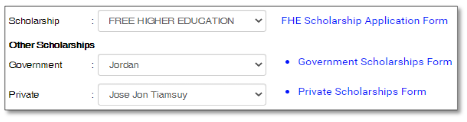
    3.4 Select type of scholarship(s) that you are going to apply in the Scholarship and Other Scholarships dropdown fields.

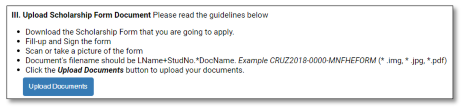
    3.5 Click the link to download the Scholarship(s) forms you are applying to. Fill-up, sign and scan or take a clear picture of your signed scholarship form(s). Follow the guidelines on how to upload the document(s) in the Upload Scholarship Form Document field.

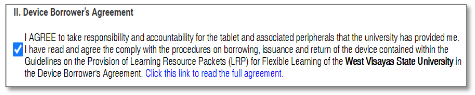
    3.6 Click the link to download the Device Borrower’s Agreement. Read and tick the check box in the Device Borrower’s Agreement field if you agree.

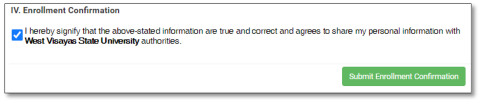
    3.7 Read the confirmation and tick the check box in the Enrollment Confirmation field if you agree.

    3.8 Click the Submit Enrollment Confirmation button to submit your application.

    Enrollment/Registration Procedures:
    Step 1: Login
    1.3 Login to the Student Module
    • User Name (Student Number)
    • Birth Date
    • Password
    1.4 Click the Login button to continue

    Step 2: Enrollment Message
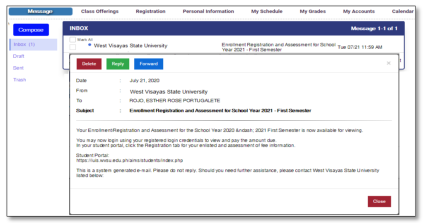
    2.1 Click the Messaging submodule, open and read the Enrollment/Registration and Assessment for School Year 2020-2021 message.
    2.2 Click the Close button when you are done.

    2.2 Click the button

    2.3 You will be directed in your Registration and Assessment page. Review the enlisted subjects and your assessment of fees.

    2.4 Select your method of payment in the Payment Option field.

    • Pay at the Cashier: if you are going to pay your due amount in the cashier’s
    window.
    • Pay Online: if you are going to pay through SM Bills and Bank over the
    Counter.

    2.5 Click the Save Registration button and download the Unofficial Registration Form.
    • Pay at the Cashier: Download the Unofficial Registration Form.
    • Pay Online: Download the Unofficial Registration Form for SM Bills Payment.

    2.6 Click the Yes, Proceed button to complete your Registration. Pay the amount due.

    **If you make a payment through online banking or over the counter bank
    payment, upload your proof of payment.

    1.1 Login to the Student Module
    1.2 Click the Upload Deposit Slip submodule
    1.3 Click the files/documents from your computer link and click the Upload file button
    to upload your bank deposit slip or any proof of payment.
    1.4 Click the Upload and Submit button after.

    ***You will be informed through email or messaging once your payment has been
    processed. Check your registered email or login to your student module account regularly
    to verify the confirmation of your payment and enrollment.

    Enrollment and Payment Confirmation Procedures:
    Step 1: Login
    1.1 Login to the Student Module
    • User Name (Student Number)
    • Birth Date
    • Password
    1.5 Click the Login button to continue

    Step 2: Enrollment Message
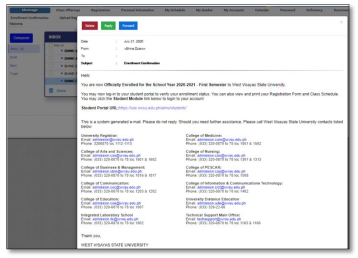
    2.1 Click the Messaging submodule, open and read the message. You will received an Enrollment Confirmation or Enrollment Payment Confirmation once you are officially enrolled.

    2.2 Click the Close button when you are done.

    2.3 Click the Registration submodule.
    2.4 Click the Generate Certificate of Registration button download your COR

    IUIS Enrollment Procedure for New Students

    Please note before you begin to avoid problems with your Enrollment Confirmation:
    1. Make sure that your information in the Enrollment Confirmation fields is complete,
    updated, and correct. If not, you can go back to your Personal Information and
    update that information.
    2. Make sure to fill-up, sign, scan, and upload the scholarship application forms
    accordingly. Follow the uploading guidelines to avoid problems.
    3. Review your information and other requirements before submitting your
    enrollment confirmation. You can no longer change or update once you have
    submitted it.
    4. The school will evaluate and approved your enrollment confirmation application.
    You will receive a notice about your enrollment through your registered email and
    student module messaging feature. You are also advised to login to your Applicant
    module from time to time to receive announcements and your Registration and
    Assessment status.

    Enrollment Confirmation Procedures:

    Step 1: Login
    1.1 Login to the Applicant’s Module
    • User Name (Applicant Number)
    • Password
    1.2 Click the Login button to continue

    Step 2: Personal Information
    2.3 After clicking the Agree and Continue button, the system will direct you to the
    Personal Information submodule to update your information.

    2.4 Update your information. Click the Save and Continue button in every tab and click
    the Update Information button to complete.

    Step 3: Enrollment Confirmation
    3.1 Click the Enrollment Confirmation submodule.
    3.2 Read the Enrollment Confirmation guidelines
    3.3 Select your terms of payment (Full Payment or Two Payments) in the Mode of Payment dropdown field.

    3.4 Select type of scholarship(s) that you are going to apply in the Scholarship and Other Scholarships dropdown fields.

    3.5 Click the link to download the Scholarship(s) forms you are applying to. Fill-up, sign and scan or take a clear picture of your signed scholarship form(s). Follow the guidelines on how to upload the document(s) in the Upload Scholarship Form Document field.

    3.6 Click the link to download the Device Borrower’s Agreement. Read and tick the check box in the Device Borrower’s Agreement field if you agree.

    3.7 Read the confirmation and tick the check box in the Enrollment Confirmation field if you agree.

    3.8 Click the Submit Enrollment Confirmation button to submit your application.

    Enrollment/Registration Procedures:
    Step 1: Login
    1.1 Login to the Applicant’s Module
    • User Name (Applicant Number)
    • Password
    1.2 Click the Login button to continue

    Step 2: Enrollment Message
    2.3 Click the Messaging submodule, open and read the message about your Enrollment/Registration and Assessment for School Year 2024-2025.
    2.4 Click the View your Assessment Link to view and download your Unofficial Registration Form and pay the amount due (if applicable).
    2.5 Click the Close button when you are done.

    ** Upload your proof of payment if you made a payment through online banking or over the counter bank payment for your amount due.

    1.1 Login to the Applicant’s Module
    1.2 Click the Upload Deposit Slip submodule
    1.3 Click the files/documents from your computer link and click the Upload file button
    to upload your bank deposit slip or any proof of payment.
    1.4 Click the Upload and Submit button after.

    * You will be notified once your payment has been processed and posted by the cashier.
    Check your registered email or login to your student module account regularly to verify
    the confirmation of your payment and enrollment.

    Enrollment and Payment Confirmation Procedures:
    Step 1: Enrollment Message
    1.1 You will receive an email about your Enrollment Confirmation or Enrollment Payment
    Confirmation once you are officially enrolled.
    1.2 You will receive a notice about your Enrollment Confirmation together with your
    Student Account credentials. In case you have not received you may call or email
    the techsupport@wvsu.edu.ph to activate your student account.
    1.3 If you have your login credentials already, log in to the student module.
    1.4 Click the Registration submodule.
    1.5 Click the Generate Certificate of Registration button to download your COR.
    1.6 Click the Sign Out button when you are done.

    FOR MORE INFORMATION, PLEASE CONTACT YOUR RESPECTIVE COLLEGE/DEPARTMENT:

    College of Arts and Sciences

    College of Nursing

    College of Business and Management

    College of Medicine

    College of Communication

    College of PESCAR

    College of Education

    College of Law

    College of Information and Communications Technology

    College of Dentistry

    University Distance Education Program

    Integrated Laboratory School

    Registrar’s Office

  • Short Version of the Guide on How to Apply using the Online Application Module

    Before you begin:

    1. Take a photo or scan your Senior High School report card.  The grades as of first semester should be in the card.  Have the image file ready for uploading later.
    2. Take a selfie photo of yourself following the Photo ID requirements Guide.  Locate the image file of your photo and resize following the image resizer guide.
    3. Check that you have a valid email address in the format firstname.lastname@gmail.com.  If your current email address does not comply with the required format, create a new one using either Gmail or Yahoo.  Note: Use of non-complying email will result in the failure of your application.

    Steps in applying for admission using the Integrated University Information System – Online Application Module:

    1. Go to http://iuis.wvsu.edu.ph/aims/applicants/

    2. Click Apply Here

    3. Fill up all text fields with correct information and select Main Campus in the list of campuses.

    *Make sure to supply the correct email address. You will need that for confirmation later.

    4. Click on Create Account and tick the privacy consent check box before continuing.

    5. An email confirmation will be sent to your inbox together with your temporary login details. Click Continue to proceed to your application

    6. Complete Steps 1 to 5 by filling all necessary fields in the application form. Make sure to provide correct details and check each entry for errors. If a field is required and no data is available, input “Not Applicable” or “NA”.

    7. Upload the image file of the Senior High report card and your ID photo.  

    8. Click Save and Continue afterwards.

    9. Read the information in the Applicant Certification field and click the Submit Application after reviewing your form.

    10. The system will send your Applicant login credentials to your email. You can login and view the notification board and your applicant data. Note: This is different from your temporary account in step 5.  Use the username and password to login to the Online Application Module to view/modify your application data.

    11. Logout of the Online Application Module.

    12. Check your email regularly for notification emails from the College(s) of the course(s) that you applied for.

    Frequently Asked Questions:

  • WVSU CALINOG CAMPUS IS NOW MIKROTIK TRAINING ACADEMY PARTNER

    West Visayas State University has now three certified MIKROTIK academic trainer in the person of Prof. Kent Alvin Cebal, Dr. Joe Bernie Esposo, and Engr. Vincent Catamin.

  • WVSU-PC SOICT Professors Earned MikroTik Certification – Bagged Home MikroTik Partnership to WVSU– Pototan Campus

    MikroTik is a Latvian company which was founded in 1996 to develop routers and wireless ISP systems. They provide hardware and software for Internet connectivity in most of the countries around the world.

    Engr. Lester L. Dela Cruz  and Prof. Edison C. Silvestre, both faculty from the School of   Information and Communications Technology (SOICT) of WVSU-Pototan Campus, are now  certified Mikrotik Academy Trainers and Consultants after having successfully completed and passed three Mikrotik training courses last January 27 to February 1, 2020 at West Visayas State University-Himamaylan Campus , Himamaylan City, Philippines conducted by WIZMASTER Mikrotik Training Center.

    Engr. Lester L. Dela Cruz and Prof. Edison C. Silvestre were recognized as Mikrotik Certified Network Associates (MTCNA), Mikrotik Certified Routing Engineers (MTCRE), and Mikrotik Certified User Management Engineers (MTCUME).

  • WVSU-LC acknowledged as a Mikrotik Certified

    WVSU-Lambunao Campus is now recognized as one of the MikroTik Academies in the Philippines, making it qualified to offer the internationally recognized Mikrotik Certified Network Associate (MTCNA) certification for free.

    MikroTik is a Latvian network equipment manufacturer. The company develops wired and wireless network routers, network switches, access points, as well as operating systems and auxiliary software (Mikrotik.com)

    Through its MikroTik RouterOS Academic Study Program for Higher Educational Institutions, MikroTik is offering academic institutions the opportunity to organize Networking classes using RouterOS as a learning tool.

    The program is open to universities, technical schools, colleges, vocational schools, and other institutions that grant academic degrees in a variety of subjects.

    Along with the recognition, WVSU-LC will also receive routers for laboratory and training equipment for free.

    Mrs. Jojo C. Garanganao, MSCS of School of Information & Communications Technology (SICT), Prof. Ma. Grace Rona L. Leal, Professor of SICT and Mr. Romer P. Pedroso, faculty of SICT attended the six (6)-day training.

    The WVSU-Lambunao Campus delegates passed the following exams, making them certified trainer of Mikrotik:

    • MikroTik Certified Network Associate (MTCNA)
    • MikroTik Certified User Management Engineer (MTCUME)
    • MikroTik Certified Routing Engineer (MTCRE)

    The training was held at the WVSU-Himamaylan Campus from January 26 to February 1, 2020.