BUILD RESILIENT INFRASTRUCTURE, PROMOTE INCLUSIVE AND SUSTAINABLE INDUSTRIALIZATION AND FOSTER INNOVATION.
A functioning and resilient infrastructure is the foundation of every successful community. To meet future challenges, our industries and infrastructure must be upgraded. For this, we need to promote innovative sustainable technologies and ensure equal and universal access to information and financial markets. This will bring prosperity, create jobs and make sure that we build stable and prosperous societies across the globe.
West Visayas State University continues to expand its reach in the fulfillment of its mandates in instruction, research, and extension.
With its International and Local Linkages Offie (ILLO) Director Prof. Edel Subong-Csoka , VP for Research, Innovation, and Extension Dr. Greta Gallo Gabinete, campus administrators Dr. Dominador Lisao of the College of Agriculture and Forestry (CAF) and Dr. Mary Josephine Bautista (Lambunao), and CAF Internationalization focal person Prof. Rod Reynan Gallego Laspiñas, WVSU had a discussion with King Mungkot’s University Of Technology Thonburi in Thailand regarding possible collaborations between the two institutions.
The WVSU delegation was welcomed by KMUTT led by Dr. Julapot Chiravachradej.
The vision for a sustainable society is shared by both schools. #
Expanding the horizon of WVSU has always been a vision for its institutional internationalization. And a vision coming true is a milestone worth sharing with the rest of Taga-West.
Dr. Joselito F. Villaruz, WVSU president, has always pushed for full force internationalization. With the International and Local Linkages Office (ILLO) headed by Director Ms. Edel Carmela Subong-Csoka, a visit to Kasetsart University in Thailand was made to foster collaborations, most especially in the fields of agriculture and forestry, and forensics.
With the study visit and institutional expansion were VP for Research, Innovation, and Extension Dr. @Greta G. Gabinete, Campus Administrators Dr. @Dominador Lisao (College of Agriculture and Forestry-CAF) and Dr. Mary Josephine Bautista (Lambunao), and Internationalization Focal Person of CAF Prof. Rod Reynan Las Pinas. #
The performance review is one of the key pillars of a performance management program—and as performance strategies have evolved, so has the need and purpose of the performance review. Performance reviews are a foundational way to leverage talent, understand needs and opportunities, and gather intelligence for making connections with employees and larger organizational strategies. They also play a central role in empowering employees by helping reach their fullest potential.
Fundamentally, checking in frequently with direct reports assists in building relationship and a cohesive team. A formal six-month performance appraisal allows for midyear adjustments, preventing surprises at the year-end performance review, thus, on August 1 and 2, 2022, the campus will conduct the Mid-Year Performance Review & 2023 Budgeting and PPMP Workshop.
WVSU-CICT’s Bachelor of Science in Entertainment and Multimedia Computing (BSEMC) pioneer batch graduated this year, as West Visayas State University holds its face-to-face Commencement Exercises 2022 on July 21, 2022, at the WVSU Cultural Center and streamed live on WVSU Facebook Page.
The Bachelor of Science in Entertainment and Multimedia Computing (BSEMC) program is one of the newest recognized programs by the Commission on Higher Education. The CHED first recognized WVSU’s BSEMC program in 2018, with Mr. Evan Sumido who was assigned as BSEMC Department Chair. Its main objective is to produce professional artists in charge of creating multimedia art products in the fields of science, entertainment, education, simulations, and advertising.
The first cohort of the BSEMC was launched last 2018 with 2 specializations: Digital Animation Technology and Game Development, at West Visayas State University-College of Information and Communication Technology, under Dr. Joel De Castro, former CICT Dean. The total of 18 students under BSEMC majoring in Digital Animation Technology received their diplomas last July 21, 2022. Out of 18 BSEMC students, 11 graduated with Latin honors, with two Magna Cum Laude, and nine Cum Laude.
This batch also brought back the Alima Artists’ Group, which became the degree’s official student group, led by Paolo Jose Abulencia. At the most recent University Virtual Org Fest 2021, the Alima Artists’ Group was hailed as the champions in a promotional video contest out of hundred organizations inside the campus.
During their Internship Training Program, the BSEMC Senior students were dispersed around various companies and studios namely, ADA Asia, Mulave Studios, Panay News, Prometheus, and GTBI on their on-the-job training which developed their expertise and get them ready for their future professions. In fact, before graduation, three BSEMC students were employed by their on-the-job training studios.
BSEMC degree in the Philippines is one of the most sought-after employment options due to the global rise of technology. The entertainment and multimedia sectors seek competitive and competent professionals to be their partners in the sector as it has been evolving for years.
To cater both students residing within and outside of Iloilo, the West Visayas State University Main Campus offers multiple payment options for efficient and secured payment procedure for its students. Given below are the different modes of payment offered by the University.
How to Pay School Fees:
Please choose a payment procedure most convenient for you. the University.
Payment at the Cash Office, WVSU Admin. Bldg., Luna St., La Paz Iloilo City
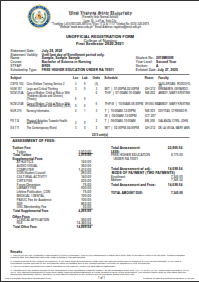
Step 1: After receipt of the confirmation of your assessment through your email or IUIS inbox, print or screenshot your **Unofficial Registration Form from your IUIS Account.
Step 2: Before going to West Visayas State University, Luna St., La Paz Iloilo City, secure an appointment to Cashier Office thru the University Ticketon System at https://wvsu.edu.ph/ticketon , wait for your appointment to be approved by the Cashier and ticket will be generated. Present your ticket to the guard at the entrance of the University upon entry.
Step 3: Go to the Admin Bldg. of the University and get a priority number for payment from the guard at the entrance for queuing.
Step 4: Proceed to Cash Office located at the Ground Floor of the WVSU Admin. Bldg. (The office is open 9:00AM-3:00PM from Monday to Friday except on official holidays).
Step 5: Present the Unofficial Registration Form to the Cashier. You may present screenshot of your Unofficial Registration Form in your mobile phones.
Step 6: Get the Official Receipt. This will serve as your proof of payment.
Payment through Other Channels
REMINDER! System will not accept payment less than or greater than the amount due based on the Assessment.
Step 1: Wait for the confirmation of your Assessment through your email or IUIS inbox before proceeding for payment.
Step 2: Read and follow the Online Payment Transaction Process Procedures below:
Student Module: Online Payment Transaction Process
Allows the students/applicants to process their tuition payments
Allows the students/applicants to process other payments such as Entrance Exam Fee, TOR, etc.
Allows the students/applicants to process their previous balances
Allows the students/applicants to view their online payment transactions
How to Pay Tuition/Assessment Fees for the Current School
Student Module Online Payment Process
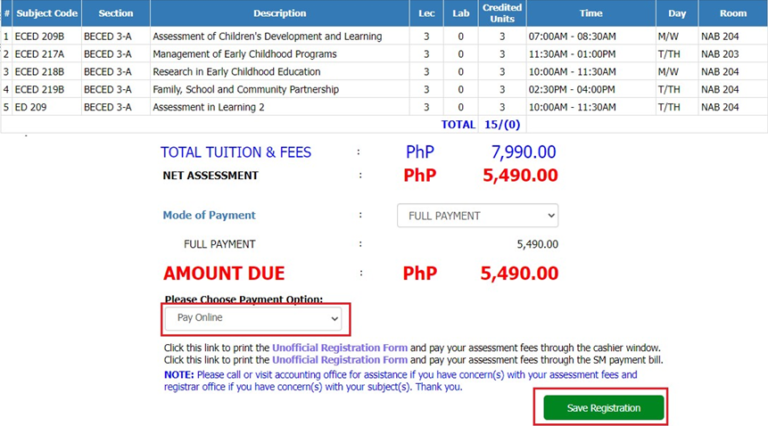
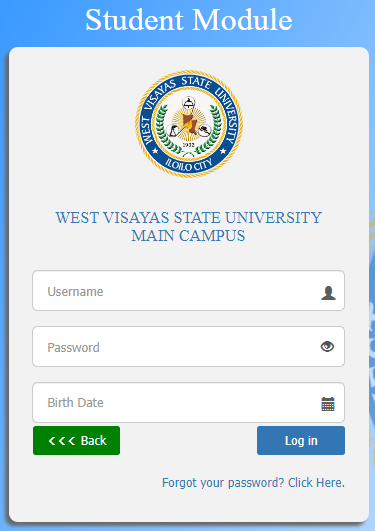
1.1 Go to this link https://iuis.wvsu.edu.ph/iuis/students 1.2 Input your log-in credentials 1.3 Click the Log-in button to proceed 1.4. In you Registration tab – Assessment page, select PAY ONLINE in the payment option dropdown box. 1.5 Click the Save Registration button afterwards
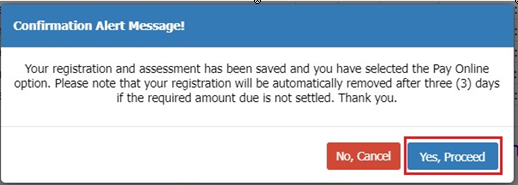
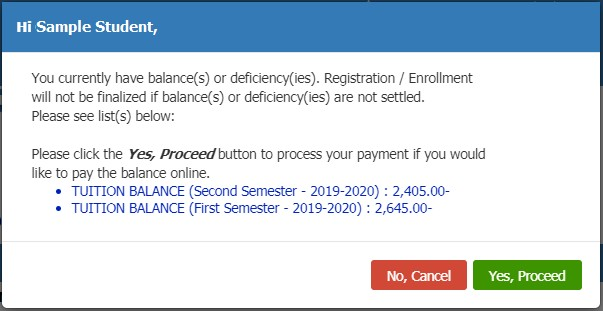
1.6 Read the Notification Alert Message and click the Yes, Proceed button to continue.
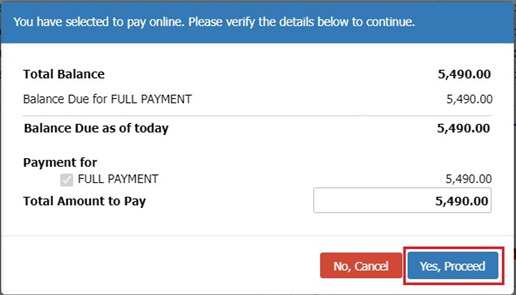
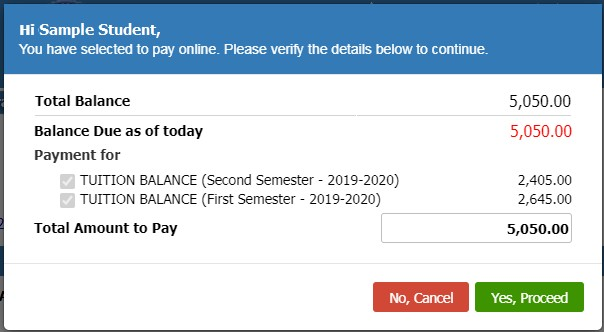
1.7 Review the amount that you are going to pay and click the Yes, Proceed button to continue your transaction.
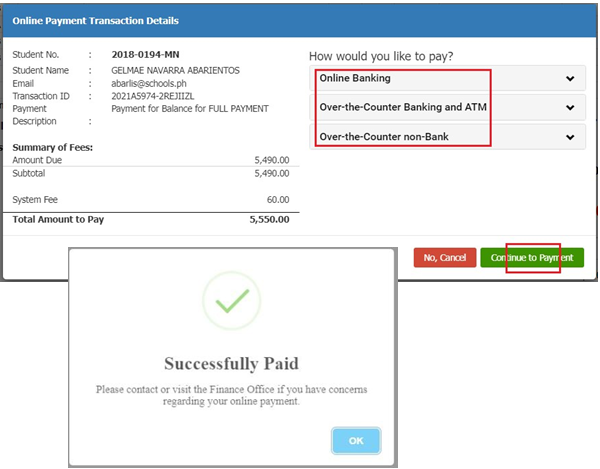
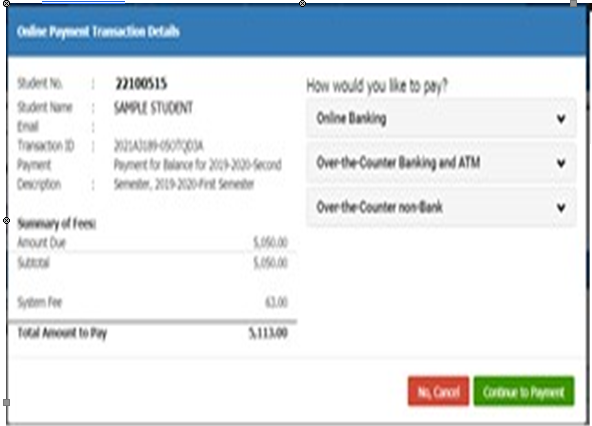
1.8 In the Online Payment Transaction Details, review your information, the Summary of Fees details and the Total Amount to Pay.
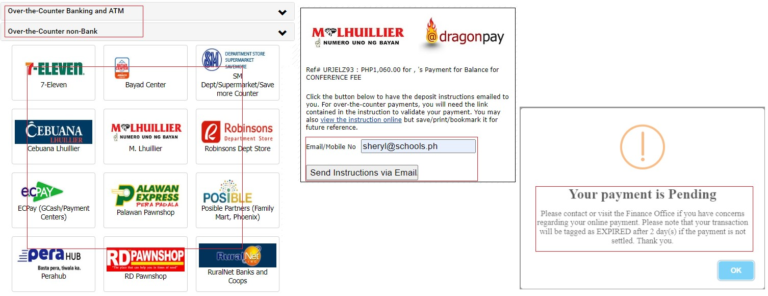
1.9 In the How would you like to pay?, select the preferred Payment Option (Online Banking, Over the Counter Banks or Non-Banks)
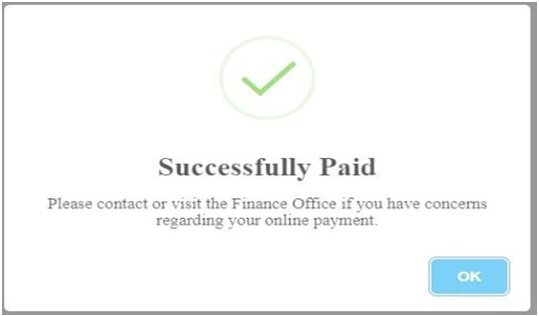
1.10. Verify the Total Amount and click the Continue to Payment button to continue until your payment is processed successfully.
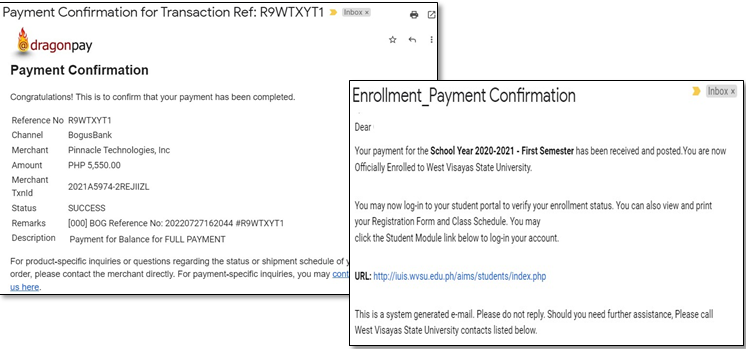
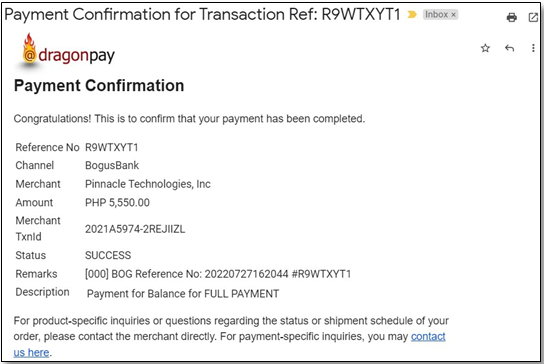
1.11. Open your email to check or view your payment confirmation.
Once your payment is successful, you will receive an email regarding your Enrollment_Payment Confirmation.
You will also receive a payment confirmation in your registered email address.
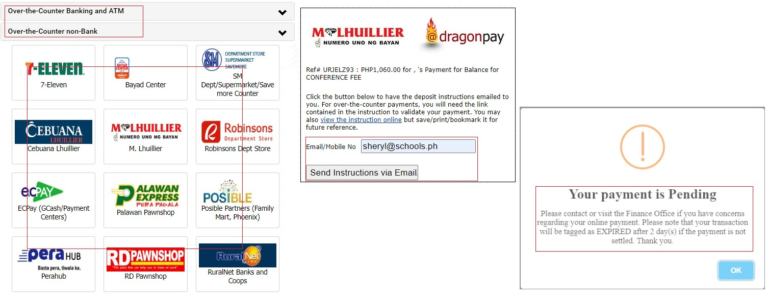
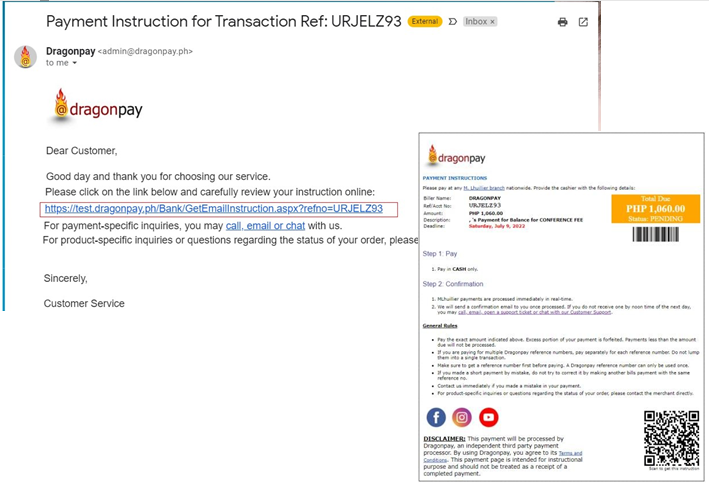
1.1 Enter your email address. The payment gateway will send the instruction to the provided email address. You will be notified on the status of your payment until you have processed it successfully.
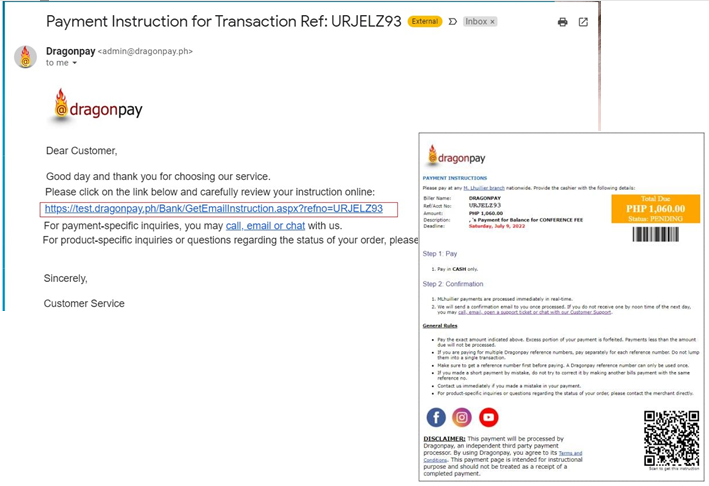
1.2 Open your email and click the link to download the instruction on how to process your payment.
1.3 Open you email again to check/view your payment confirmation once you have processed the payment successfully.
How to Pay Previous Balance(s)
Student Module Online Payment Process
1.1 In Student Module, go to your Registration tab. Your previous balance(s) will display in the pop-up form.
1.2 Review the SYSEM and Amount details and click the Yes, Proceed button to process the payment.
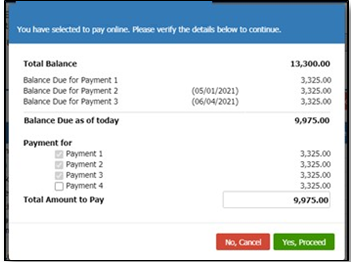
1.3 Another pop-up form will display with the total amount due of the previous balance(s) that you are going to pay. The system will automatically select the due balances.
1.4 Verify the Total Amount to Pay and click the Yes, Proceed button to continue the transaction.
1.5 In the Online Payment Transaction Details, review your information, the Summary of Fees details and the Total Amount to Pay.
1.6 In the How would you like to pay?, select the preferred Payment Option (Online Banking, Over the Counter Banks or Non-Banks)
1.8 Open your email to check or view your payment confirmation.
Once your payment is successful, you will receive an email regarding your payment confirmation.
1.7 Verify the Total Amount and click the Continue to Payment button to continue until your payment is processed successfully.
1.4 Enter your email address. The payment gateway will send the instruction to the provided email address. You will be notified on the status of your payment until you have processed it successfully.
1.5 Open your email and click the link to download the instruction on how to process your payment.
1.6 Open you email again to check/view your payment confirmation once you have processed the payment successfully.
Booking your dream vacation is simple! Learn how to select destinations, customize your itinerary, and secure your booking through our easy process.
Together with partners, University of Antique and Northern Negros State College of Science and Technology (now State University of Northern Negros) , WVSU visited the Kingdom of Thailand.
WVSU University President Dr. Joselito Villaruz Bebong Villaruz has always envisioned the University’s full force internationalization. This may be just “baby steps” but it’s meant to conquer. #padayonwvsu#WVSUexcels
First stop is Mahidol University International College.
State universities and colleges in Western Visayas led by focal designate SUC West Visayas State University will be participating in SUC Fair 2022 from June 28 to July 1, 2022 at the SM Mall of Asia (MOA) Music Hall. The national university fair makes an exciting comeback after a two-year hiatus brought about by the pandemic. This year’s SUC fair will commemorate the Commission on Higher Education’s 28th anniversary as well as National Higher Education Day as a venue to recognize the invaluable contribution of stakeholders in advancing higher education, research and development and to showcase the products and talents of SUCS from all over the country.
As the center of education in the heart of the Philippines, SUCS in Western Visayas will collectively be promoting sustained excellence, unified efforts and competitive standards through a regional bazaar product display of innovative products that will showcase the best that the region has to offer. Visayan Vignettes will also be presented through an engaging cultural show as well as exciting fair competitions.
The general public as well as students, alumni, supporters and exponents of higher learning are invited to visit SUCS Fair 2022 and share experiences online through tagline #WeAreSUC. (wvsu-uedc)
WVSU President Dr. Joselito F. Villaruz and CBM Dean Dr. Ma. Corazon Samorin attending the Meeting for the Project FAB Master’s Programme in Family Business Management (Contract No 619264-EPP-1-2020-1-KH-EPPKA2-CBHE-JP).
FAB is one of the projects of the University under the Erasmus+ Capacity Building projects in the field of Higher Education (CBHE).
Present are partner representatives from Portugal, Greece, Cyprus, Cambodia, Malaysia, Philippines, Bangladesh, Bhutan and Nepal
Read the instructions carefully before you start using the online application.
All documentary requirements must be submitted online. Applicants with incomplete requirements will not be considered for evaluation.
Applicants with existing WVSU IUIS Account (enrolled at WVSU, Main Campus from AY 2009-2010 and onwards) shall only email a Letter of Intent to the College where the applicant wishes to apply.
I. Online Application Period for Second Semester AY 2022-2023
II. Criteria for Graduate School Admissions
For Master’s Program
A bachelor’s degree with a weighted average of 2.0 or its equivalent
Entrance examination results
Potential for graduate work and educational leadership based on results of interview
A graduate of bachelor’s degree program (For College/School of Education, the applicants are education/diploma in teaching graduates or have teaching experience.)
Physical and medical examination for qualified applicants
For Doctoral Program
A master’s degree with a GPA of at least 1.75 or its equivalent
Entrance examination results
Potential for graduate work and educational leadership based on results of interview
A graduate of master’s degree program (thesis or non-thesis)
Physical and medical examination for qualified applicants
III. Requirements:
a. Transcript of Records for Evaluation Purposes only b. Passport Size Photo Note: Other Entrance Credentials shall be submitted to the respective College
IV. Application Process
A. Scan or take a photo of your requirement . Have the image files ready for uploading later.
C. Your email address should have your first and last name for easier verification. It could be done on any format. Example: firstname.lastname@gmail.com or lastname.firstname@gmail.com. If none of the format is available, try adding your birth year or birthday at the end of your email (e.g. firstname.lastname0102@gmail.com). If your current email address does not comply with the required format, create a new one using Gmail. Use of non-complying email will result to failure of your application.
Fill out all text fields with correct information and select Main Campus in the list of campuses. Make sure to supply the correct email address. You will need that for confirmation later.
Click Create Account and tick the privacy consent check box.
An email confirmation will be sent to your inbox together with your temporary login details. Click Continue to proceed to your application.
Complete Steps 1 to 5 by filling all necessary fields in the application form. Make sure to provide correct details and check each entry for errors. If a field is required and data is not available, input “Not Applicable” or “NA”.
Upload the image files of the requirements and your ID photo.
Click Save and Continue afterwards.
Read the information in the Applicant Certification field and click the Submit Application after reviewing your form.
The system will send your Application login credentials to your email. You can login and view the notification board and your applicant data. Note: This is different from your temporary account in step 5. Use the username and password to login to the Online Application Module to view/modify your application data.
Logout in the Online Application Module.
Check your email regularly for notification emails from the Registrar or College(s) of the program that you applied for.
CONTACT INFORMATION OF THE GRADUATE SCHOOL OFFICES: WVSU Trunkline (033) 320-08-70 to 77