Category: Guidelines

  • GENERAL GUIDELINES ON WVSU UNDERGRADUATE ADMISSIONS

    FOR AY 2026 – 2027

    IMPORTANT REMINDERS

    1. DO NOT create multiple accounts. This may put your application at risk.
    2. Read the instructions carefully before you start using the Online Application.
    3. Check your valid email address in this format: firstname.lastname@gmail.com or lastname.firstname@gmail.com. If none of the format is available, try adding your birth year or birthday at the end of your email (e.g. firstname.lastname0102@gmail.com). Your application will be rejected if you use non-compliant email.

    I. ONLINE APPLICATION PERIOD:
    October 27, 2025 – December 15, 2025

    II . Administration of WVSU Admission Examination (WVSU AE):
    March 8, 2026

    III. GENERAL GUIDELINES ON ADMISSIONS

    With a solid reputation in providing quality education, West Visayas State University (WVSU) upholds a democratized admissions policy as a strategy to make the admissions process more inclusive and equitable. It provides opportunities for a wider range of students, particularly those from disadvantaged backgrounds, to access higher education, in accordance with RA No. 10931 (Universal Access to Quality Tertiary Education Act). To support this direction, the WVSU system allocates 10% of the total entrants’ slots to the marginalized sectors of society, provided they meet the minimum admission requirements for the program to which they apply.

    Screening and Admission Process:

    1. The West Visayas State University Admission Examination (WVSU AE) is open to all Senior High School graduates or graduating students from DepEd-accredited local and foreign schools.
    2. WVSU advocates open access and equity to all applicants. No qualified students shall be denied admission to the University’s academic programs by reason of age, sex, ethnic considerations, or religious beliefs or affiliations (Article 125, Section 1, University Code 2013).
    3. An applicant for admission to a degree program must comply with all the documentary requirements for admission prescribed by the University.
    4. Transfer students may be admitted to the University except for colleges that have special provisions for transferees (Article 136, Section 1, University Code 2013). Some Colleges/Campuses may accept transferees depending on the applicant’s scholastic merits (no failing grade, no incomplete or dropped courses, and no grade lower than 85 or its equivalent) and on available slots as determined by the Deans/Campus Administrators. 
    5. Applicants can choose three (3) Priority Programs/Specializations. The first priority will be considered in determining the qualifiers for college admission. However, applicants are asked to provide their second and third choices as additional data and may be considered if the quota is not reached in the initial ranking.
    6. The Colleges and Campuses shall determine the actual number of students to be enrolled in each program and the projected number or quota of students that they can accommodate for local selection (Article 125, Section 2, University Code 2013).
    7. Eligible applicants will proceed to the College/School selection process and satisfy other requirements.
    8. The Colleges and Campuses shall follow the Standard Operations Instructions (SOI) of their local admissions.
    9. The Offices of the Registrar at the Main and Satellite Campuses shall:
      1. serve as the authorized units to accept all applications and all documentary requirements related to admission;
      2. release the WVSU AE results to applicants, colleges, and schools in campuses;
      3. coordinate with colleges and schools to synchronize the schedules of local selection; and
      4. gather final lists of qualified applicants for enrolment.
    10. All applications shall be made through the WVSU Online Application Module. Required documents will be uploaded to the Integrated University Information System (IUIS) portal.

      Please see attached annexes:
      a. Annex A – Steps in Applying for Admission using the Online Application Module
      b. Annex B – Curricular Offerings
      c. Annex C – Contact Information

    IV. REQUIREMENTS

    The applicant shall submit the following documents:

    For Graduating Grade 12 Students:For Grade 12 Graduates:For Transfer Students:

    1. Certified True Copy of Grade 12 Report Card that reflects the grades in the 1st Quarter OR Certification from the School Principal that the applicant is graduating this AY 2025-2026

    2. One (1) Passport size (35 mm x 45 mm) photo taken within 6 months
    1. Certified True Copy of Grade 12 Report Card

    2. One (1) Passport size (35 mm x 45 mm) photo taken within 6 months

    1. Certified True Copy of Transcript of Records from the school last attended with remarks “For evaluation purposes only”

    2. One (1) Passport size (35 mm x 45 mm) photo taken within 6 months

    V. STEPS IN APPLYING FOR ADMISSION USING THE ONLINE APPLICATION MODULE

    1. For Main Campus applicants, go to https://iuis.wvsu.edu.ph/iuis/applicants/index.php
      For CAF applicants, go to https://iuis-caf.wvsu.edu.ph/applicants/index.php
      For Calinog Campus applicants, go to https://iuis-calinog.wvsu.edu.ph/applicants/index.php
      For Himamaylan City Campus applicants, go to https://iuis-himamaylan.wvsu.edu.ph/applicants/index.php
      For Janiuay Campus applicants, go to https://iuis-janiuay.wvsu.edu.ph/applicants/index.php
      For Lambunao Campus applicants, go to https://iuis-lambunao.wvsu.edu.ph/applicants/index.php
      For Pototan Campus applicants, go to https://iuis-pototan.wvsu.edu.ph/applicants/index.php
    2. Click “Apply Here” button
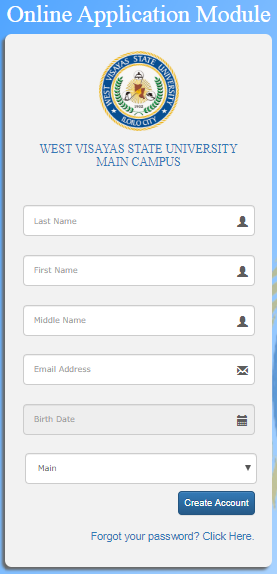
    3. Fill out all text fields with correct information and select the campus. Please ensure you provided the correct email address. You will need that for confirmation later.
    4. Click “Create Account” button.
    5. Check your registered email address for your Email Verification Code.
    6. Fill out the verification code and click “Verify Code” button.
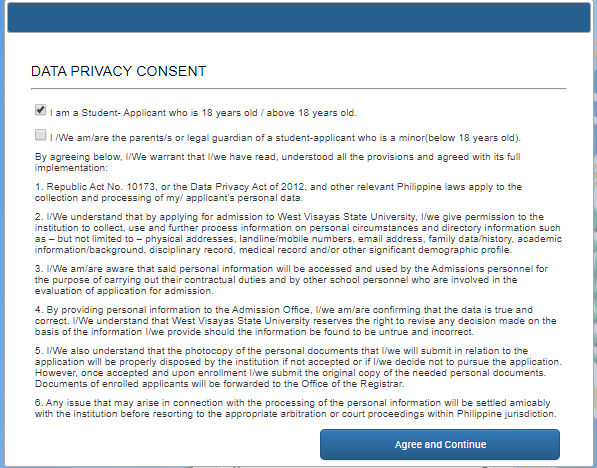
    7. Tick the privacy consent check box and click “Agree and Continue” button.
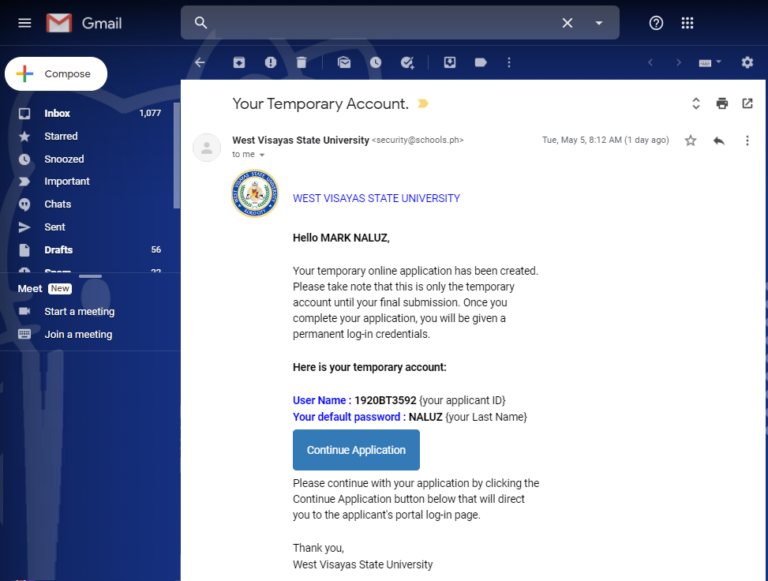
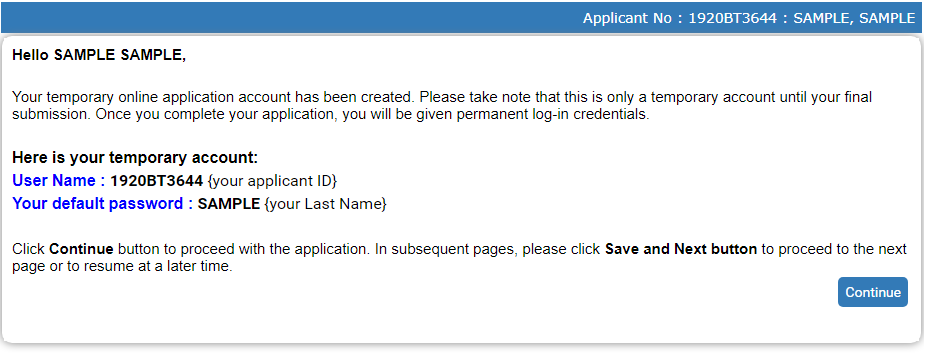
    8. An email confirmation will be sent to your inbox together with your temporary login details. Click “Continue” to proceed to your application.
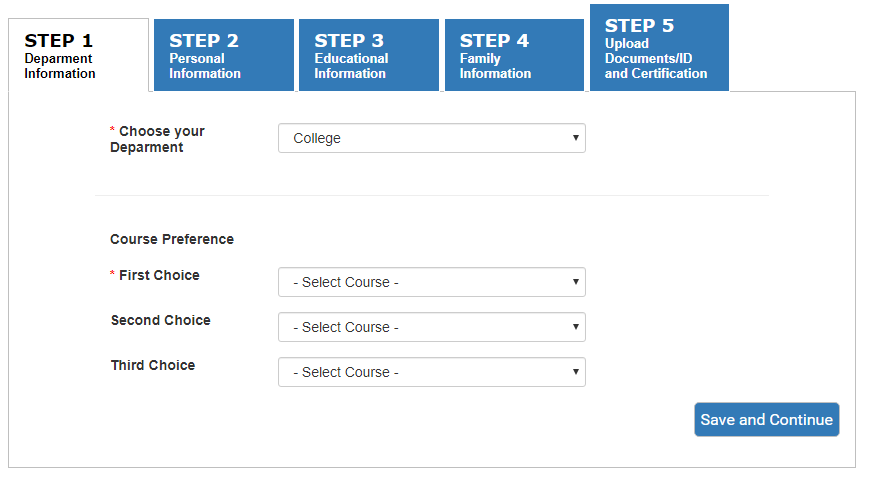
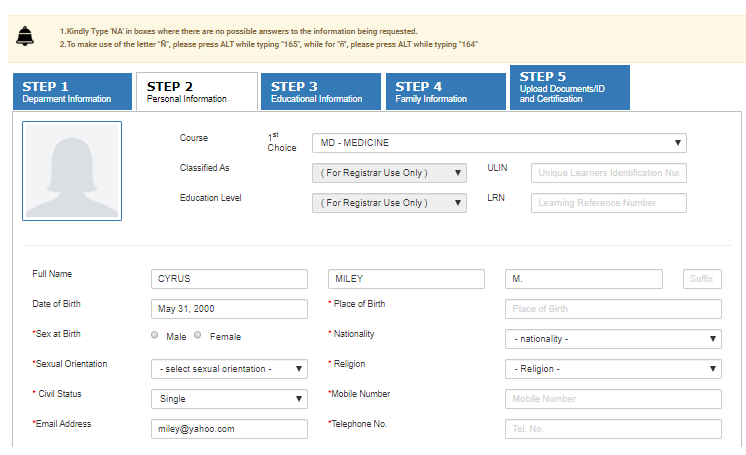
    9. Complete Steps 1 to 5 by filling all necessary fields in the application form. Ensure that you provided correct details and verify each for accuracy. If a field is required and data is not available, write “Not Applicable” or “NA”.
    10. Upload/Attach your photo (passport size) and scanned Report Card / Transcript of Records.
    11. Click “Upload and Submit” button.
    12. Click “Okay” button to process the uploading of your files.
    13. Read the information in the Applicant Certification field and click the “Submit Application” button after reviewing your form.
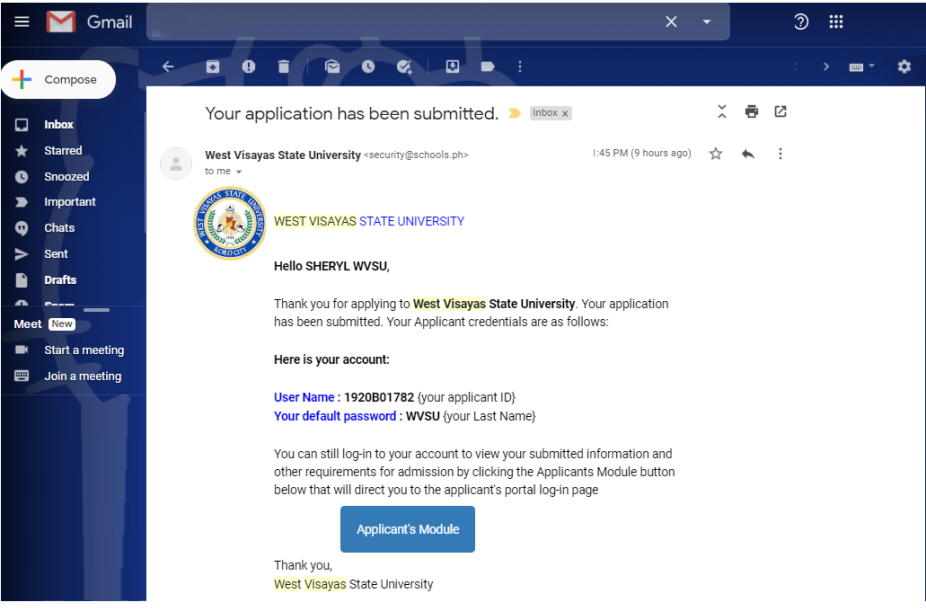
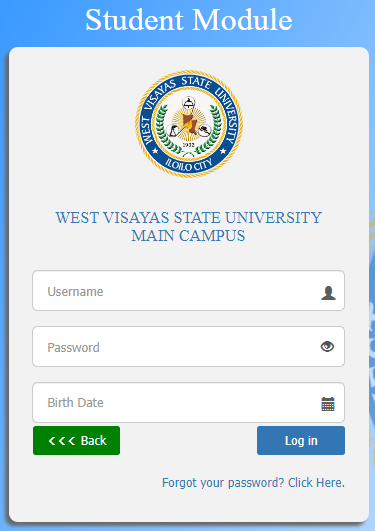
    14. The system will send the Application login credentials to your email. You can log in and view the notification board and your applicant data.
      Note: This is different from your temporary account in step 5. Use the username and password to login to the Online Application Module to view or modify your application data.
    15. Be sure to logout from the Online Application Module.
    16. Check your email regularly for notifications from the Registrar or your College or Campus.

    VI. CURRICULAR OFFERINGS

    Undergraduate Level

    MAIN CAMPUS

    • Bachelor of Arts in English Language Studies
    • Bachelor of Arts in Foreign Language
    • Bachelor of Arts in Political Science
    • Bachelor of Science in Applied Mathematics
    • Bachelor of Science in Biology
    • Bachelor of Science in Chemistry
    • Bachelor of Science in Psychology
    • Bachelor of Arts in Broadcasting
    • Bachelor of Arts in Journalism
    • Bachelor of Science in Development Communication
    • Bachelor of Early Childhood Education
    • Bachelor of Elementary Education
    • Bachelor of Secondary Education
      • English
      • Filipino
      • Mathematics
      • Science
      • Social Studies
      • Values Education
    • Bachelor of Special Needs Education
      • Elementary School Teaching
      • Teaching Deaf and Hard-of-Hearing Learners
    • Bachelor of Science in Business Administration
      • Financial Management
      • Operations Management
    • Bachelor of Science in Cooperatives Management
    • Bachelor of Science in Hospitality Management
    • Bachelor of Science in Tourism Management
    • Doctor of Dental Medicine
    • Bachelor of Science in Nursing
    • Bachelor of Library and Information Science
    • Bachelor of Science in Computer Science
    • Bachelor of Science in Entertainment and Multimedia Computing
    • Bachelor of Science in Information Systems
    • Bachelor of Science in Information Technology
    • Bachelor of Culture and Arts Education
    • Bachelor of Performing Arts
      • Dance Track
    • Bachelor of Physical Education
    • Bachelor of Science in Exercise and Sports Sciences
      • Fitness and Sports Coaching
    1. WVSU Expedited Select Track for Medicine (WEST Med)

      The WVSU Expedited Select Track for Medicine (WEST Med) is an innovative program adapted by the WVSU College of Medicine in accordance to CHED’s CMO No. 11, s. 2023, Guidelines for the Accelerated Pathway to Medicine (APMed) program. This will be in coordination with CHED – approved pre – medical courses from the WVSU College of Arts and Sciences that serves as a preparatory program for the degree of Doctor of Medicine. The WEST Med will offer a 7 – year Doctor of Medicine program to exceptional students of the region and nearby provinces.

    EXTERNAL CAMPUSES

    1. Bachelor of Science in Agriculture
      1. Agricultural Economics
      2. Animal Science
      3. Crop Science
    2. Bachelor of Science in Forestry
    1. Bachelor of Elementary Education
    2. Bachelor of Secondary Education
      1. English
      2. Mathematics
    3. Bachelor of Science in Entrepreneurship
    4. Bachelor of Science in Hospitality Management
    5. Bachelor of Science in Information Technology
    6. Bachelor of Science in Office Administration
    1. Bachelor of Elementary Education
    2. Bachelor of Physical Education
    3. Bachelor of Secondary Education
      1. English
      2. Filipino
      3. Mathematics
      4. Social Studies
    4. Bachelor of Science in Hospitality Management
    5. Bachelor of Science in Information Technology
    1. Bachelor of Elementary Education
    2. Bachelor of Secondary Education
      1. English
      2. Filipino
      3. Mathematics
      4. Social Studies
    3. Bachelor of Science in Hospitality Management
    4. Bachelor of Science in Industrial Technology
      1. Automotive Technology
      2. Drafting Technology
      3. Electrical Technology
      4. Electronics Technology
    5. Bachelor of Science in Information Technology
    6. Bachelor of Science in Radiologic Technology
    1. Bachelor of Elementary Education
      1. General Education
    2. Bachelor of Secondary Education
      1. English
      2. Filipino
      3. Mathematics
      4. Social Studies
    3. Bachelor of Science in Criminology
    4. Bachelor of Science in Hospitality Management
    5. Bachelor of Science in Industrial Technology
      1. Automotive Technology
      2. Electrical Technology
      3. Electronics & Communications Technology
      4. Food Technology
      5. Heating, Ventilating, Air Conditioning & Refrigeration Technology
    6. Bachelor of Science in Information Technology
    7. Bachelor of Technical – Vocational Teacher Education
      1. Electrical Technology
      2. Food Service Management
    1. Bachelor of Elementary Education
    2. Bachelor of Secondary Education
      1. English
      2. Mathematics
      3. Social Studies
    3. Bachelor of Science in Hospitality Management
    4. Bachelor of Science in Industrial Technology
      1. Architectural Drafting Technology
      2. Automotive Technology
      3. Electrical Technology
      4. Electronics & Communications Technology
      5. Welding Technology
    5. Bachelor of Science in Information Systems
    6. Bachelor of Science in Information Technology
    7. Bachelor of Technical Vocational Teacher Education

    VII. CONTACT INFORMATION

    For more information and other admission related-concerns, you may contact the following:

    CAMPUS

    EMAIL ADDRESS

    TELEPHONE NUMBER

    Main Campus

    Address: Luna St., La Paz, Iloilo City

    admission@wvsu.edu.ph 

    (033) 3200870 – 78 loc. 1112 & 1113

    College of Agriculture and Forestry

    Address: Jayobo, Lambunao, Iloilo

    cafregistrar@wvsu.edu.ph

    09177055089

    09177055624

    Calinog Campus

    Address: Simsiman, Calinog, Iloilo

    calinog.admission@wvsu.edu.ph 

    (033) 3301634 loc. 104

    (033) 3301613

    Himamaylan City Campus

    Address: Brgy. Caradio-an, Himamaylan City, Negros Occidental

    hcc.registrar@wvsu.edu.ph

     09167990850

    09284290378

    Janiuay Campus

    Address: Janiuay, Iloilo

    registrar.jc@wvsu.edu.ph 

    (033) 3303485

    Lambunao Campus

    Address: Lambunao, Iloilo

    lambunao.admission@wvsu.edu.ph 

    (033) 5338053 loc. 112

    Pototan Campus

    Address: Pototan, Iloilo

    pototan.registrar1@wvsu.edu.ph

    (033) 5296129

    Management Information System (MIS) Office Technical Support

    techsupport@wvsu.edu.ph

    (033) 3200870 – 78 loc. 1163

  • How to Resize an Image for IUIS Profile Photo

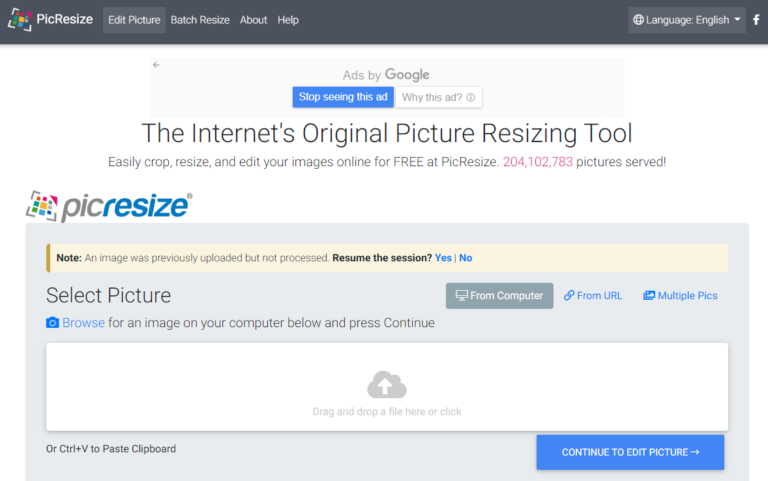
    Step 1: Go to https://picresize.com/

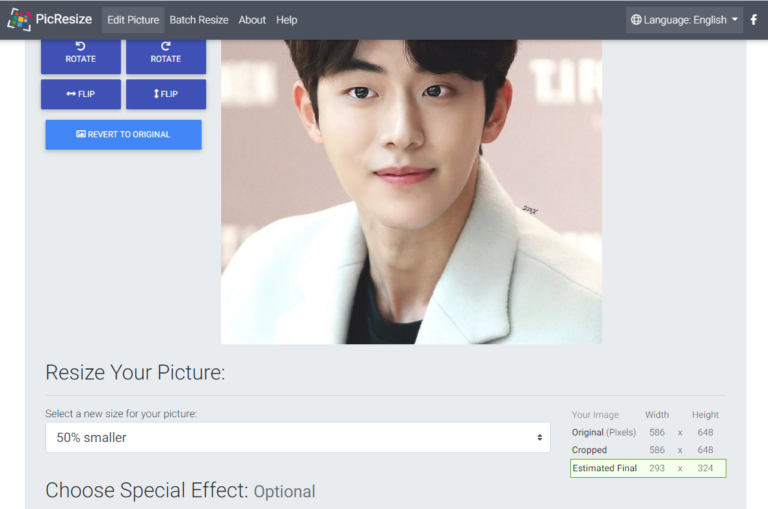
    Step 2: Drag the files to Drag and Drop area and clink CONTINUE TO EDIT PICTURE. The upload image will come out with default size presets.

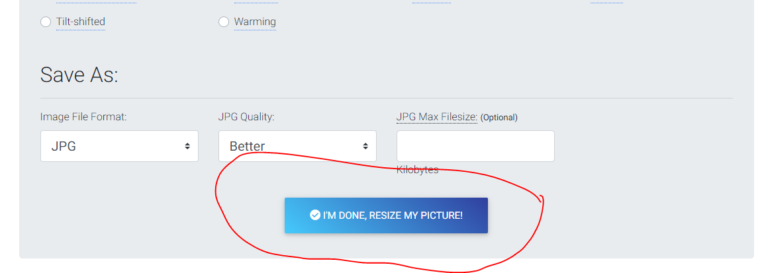
    Scroll down and Click the button below

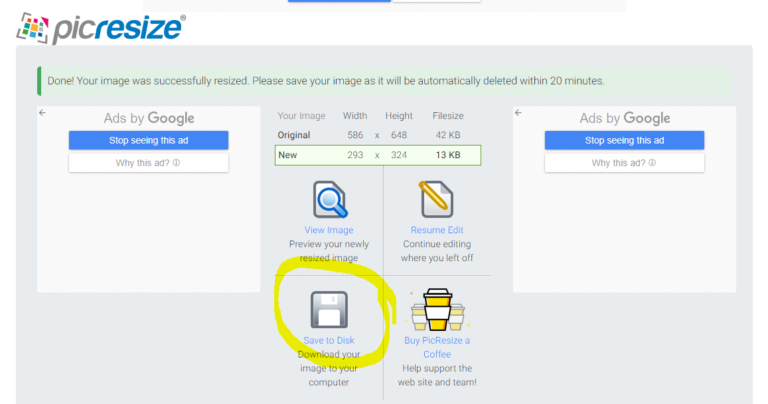
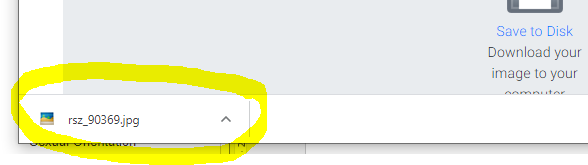
    Step 3: Download the file

    After Download , you may upload the resized image to your IUIS Profile Photo.

    Frequently Asked Questions:

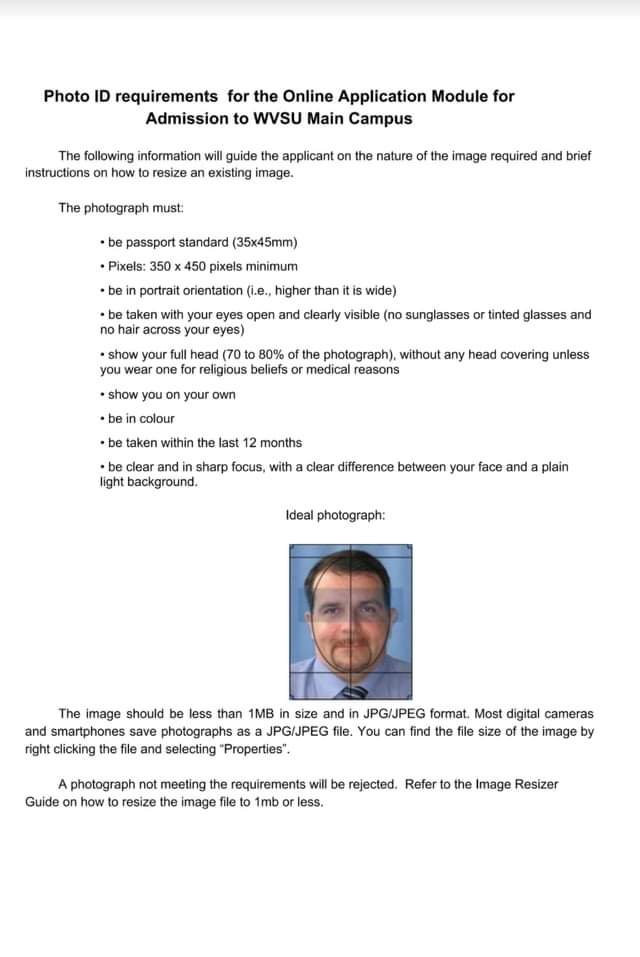
  • Photo ID Requirements for the Online Application Module for Admission to WVSU Main Campus

    The following information will guide the applicant on the nature of the image required and brief instructions on how to crop and resize an existing image.

    The photograph must:

    • be passport standard (35x45mm)

    • Pixels: 350 x 450 pixels minimum

    • be in portrait orientation (i.e., higher than it is wide)

    • be taken with your eyes open and clearly visible (no sunglasses or tinted glasses and no hair across your eyes)

    • show your full head (70 to 80% of the photograph), without any head covering unless you wear one for religious beliefs or medical reasons

    • show you on your own

    • be in colour

    • be taken within the last 12 months

    • be clear and in sharp focus, with a clear difference between your face and a plain light background.


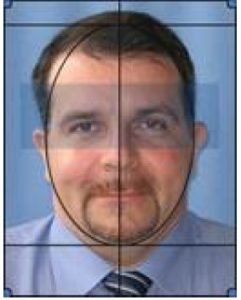
    Ideal Photograph :

    The image should be less than 1MB in size and in JPG/JPEG format. Most digital cameras and smartphones save photographs as a JPG/JPEG file. You can find the file size of the image by right clicking the file and selecting “Properties”.


    A photograph not meeting the requirements will be rejected.  Refer to the image resizer guide on how to resize the image file to 1mb or less.


    Frequently Asked Questions:

  • General Information on WVSU Graduate School Admission

    Important Reminders:

    1. Read the instructions carefully before you start using the online application.
    2. All documentary requirements must be submitted online. Applicants with incomplete requirements will not be considered for evaluation.
    3. Applicants with existing WVSU IUIS Account (enrolled at WVSU, Main Campus from AY 2009-2010 and onwards) shall only email a Letter of Intent to the College where the applicant wishes to apply.
    4. Applicant without existing WVSU IUIS Account (graduate of WVSU External Campuses and other schools) shall fill out the IUIS Online Application Module. Please go to wvsu.edu.ph/how-to-apply-using-the-online-application-module/for more info.

    I. Online Application Period for 1st Semester, AY 2024-2025: June 1 – 15, 2024

    II.  Criteria for Graduate School Admissions

    For Master’s Program

    • A bachelor’s degree with a weighted average of 2.0 or its equivalent
    • Entrance examination results
    • Potential for graduate work and educational leadership based on results of interview
    • A graduate of bachelor’s degree program (For College/School of Education, the applicants are education/diploma in teaching graduates or have teaching experience.)
    • Physical and medical examination for qualified applicants

    For Doctoral Program

    • A master’s degree with a GPA of at least 1.75 or its equivalent
    • Entrance examination results
    • Potential for graduate work and educational leadership based on results of interview
    • A graduate of master’s degree program (thesis or non-thesis)
    • Physical and medical examination for qualified applicants

    III. Requirements:

    1. Transcript of Records for Evaluation Purposes only
    2. One (1) recent Passport size (35 mm x 45 mm) ID photo

    Note: Other Entrance Credentials shall be submitted to the respective College

     IV. Application Process

      1. Scan or take a photo of your requirements.Have the image files ready for uploading later.
      2. Provide a digital/scanned ID photo of yourself. Make sure to follow the Photo ID requirements Guide
      3. Your email address should have your first and last name for easier verification. It could be done on any format. Example:  firstname.lastname@gmail.com or lastname.firstname@gmail.com. If none of the format is available, try adding your birth year or birthday at the end of your email (e.g. firstname.lastname0102@gmail.com). If your current email address does not comply with the required format, create a new one using Gmail.  Use of non-complying email will result to failure of your application.
    1. Go to https://iuis.wvsu.edu.ph/iuis/applicants/
    2. Click Apply Here
    3. Fill out all text fields with correct information and select the campus. Make sure to supply the correct email address. You will need that for confirmation later.
    4. Click Create Account.
    5. Check your registered email address for your Email Verification Code.
    6. Fill out the verification code and click Verify Code.
    7. Tick the privacy consent check box and click Agree and Continue.
    8. An email confirmation will be sent to your inbox together with your temporary login details. Click Continue to proceed to your application.
    9. Complete Steps 1 to 5 by filling all necessary fields in the application form. Make sure to provide correct details and check each entry for errors. If a field is required and data is not available, write “Not Applicable” or “NA”.
    10. Upload the image files of your ID photo and the required documents.
    11. Click Upload and Submit.
    12. Click Okay to process the uploading of your files.
    13. Read the information in the Applicant Certification field and click the Submit Application after reviewing your form.
    14. The system will send your Application login credentials to your email. You can login and view the notification board and your applicant data.
      Note: This is different from your temporary account in step 5. Use the username and password to login to the Online Application Module to view / modify your application data.
    15. Be sure to logout from the Online Application Module.
    16. Check your email regularly for notification emails from the Registrar or College(s) of the course(s) that you applied for.

    V. CONTACT INFORMATION OF THE GRADUATE SCHOOL OFFICES: WVSU Trunkline (033) 320-08-70 to 77

    1. Office of the Registrar – Main Campus admission@wvsu.edu.ph 1112 & 1113
    2. College of Arts and Sciences cas@wvsu.edu.ph-loc. 1112 & 1113
    3. College of Agriculture and Forestrycaf@wvsu.edu.ph-loc. 1126 or (033) 396-2596
    4. College of Business and Managementcbm@wvsu.edu.ph-loc. 1816 & 1817
    5. College of Communicationcoc@wvsu.edu.ph-loc. 1202 & 1203
    6. College of Education coe@wvsu.edu.ph-loc. 1807 & 1808
    7. College of Information and Communications Technology cict@wvsu.edu.ph-loc. 1402 & 1403
    8. College of Nursing con@wvsu.edu.ph-loc. 1301 & 1313
    9. College of PESCAR cop@wvsu.edu.ph-loc. 1508 & 1501
    10. University Distance Education distance_ed@wvsu.edu.ph- 1818
  • How to Apply using the Online Application Module

    Before you begin:

    1. Take a photo or scan your Senior High School report card(for Undergraduate Applicant) and Transcript of Records (for Graduate School applicant). For Senior High School graduates,  the grades as of first semester should be in the card.  Have the image file ready for uploading later.
    2. Take a selfie photo of yourself following the Photo ID requirements Guide.  Locate the image file of your photo and resize following the image resizer guide.
    3. Check that you have a valid email address in the format firstname.lastname@gmail.com.  If your current email address does not comply with the required format, create a new one using either Gmail or Yahoo.  Note: Use of non-complying email will result in the failure of your application.
    4. Go to http://iuis.wvsu.edu.ph/aims/applicants/


    STEP 1

    In the Online Application module click the Apply Here button.


    STEP 2

    Input the required information in the space provided and Click the Create Account button to continue.

    • Last name
    • First name
    • Middle name
    • Email Address
    • Birth Date


    STEP 3

    Read the Data Privacy Consent and click the tick box that applies to you. click the Agree and Continue button to proceed with your application.

    • I am a Student- Applicant who is 18 years old / above 18 years old.

    •  I /We am/are the parents/s or legal guardian of a student-applicant who is a minor (below 18 years old).


    STEP 4

    The system will provide you the temporary log-in credentials. This will allow you to log-in anytime and continue your application. The system will also automatically send the temporary log-in credentials to your registered email address. Login here


    STEP 5

     Click the Continue button to complete your application.


    STEP 6

    In the Department Information, choose the Department type that applies to you and Select your preferred course or program and click the Save and Continue button.


    STEP 7

    Input all the necessary information in the provided fields of the application form in all tabs.

    • Personal Information
    • Educational information
    • Family Information


    STEP 8

    Click the Save and Continue button to proceed to the next tab and to make sure that your Information is saved successfully in the system. The Upload Documents/ ID and Certificate tab, this will allow you to upload your applicant ID photo and the scanned required documents for admission.

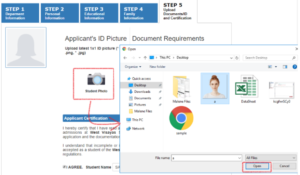
    How to Upload your Applicant ID Photo:


    How to Upload your Applicant ID Photo:

    1. Select the Student Photo icon. The system will display the documents and photos from your computer.
    2. Select your photo and click the open button. It will automatically upload your photo.

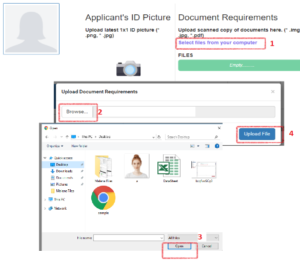
    How to Upload Your Scanned Copy of Documents:

    1. Select the link select files from your computer.
    2. Click the Browse button. The system will display the documents from your computer.
    3. Select the document or image that you are going to upload.
    4. Click the Open button
    5. Click the Upload File button

    Note: You select multiple documents or image, then click the Open button.


    STEP 9

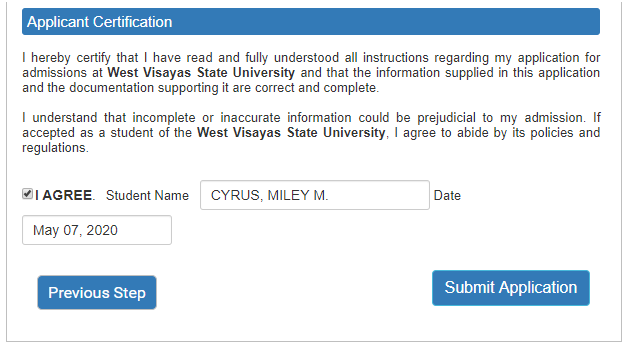
    Read the information in the Applicant Certification field and click the Submit Application and Okay button once you are done.

    Note: You can click the Previous button to go back to the earlier tabs to review the information that you encoded in your application form. Make sure that you will conduct a review before submitting your application form.


    STEP 10

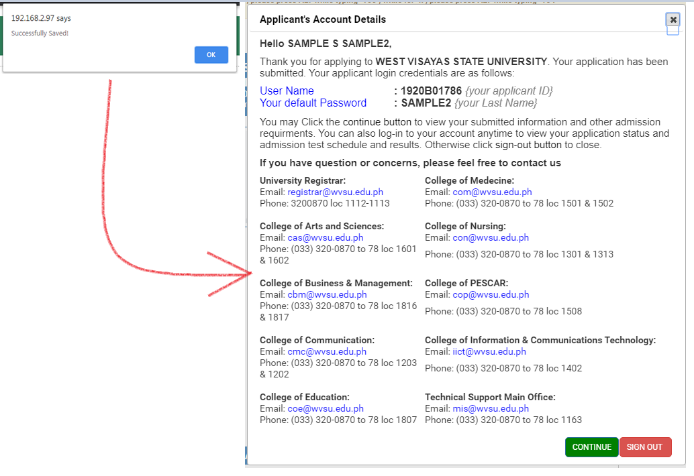
    Read the information posted in the Applicant’s Account Details form. Once this form pop-out it means that your application has been submitted and you are provided a permanent applicant log-in credentials.

    • You can use this log-in details to log-in anytime to to view your application status and admission test schedule and results
    • The system will also automatically send the permanent log-in credentials to your registered email address.


    STEP 11

    Click the Continue button to view the following:

    • Notification Board
    • Applicant Information


    STEP 12

    Otherwise click the Sign-out button.

    Note:

    • It is important to change your password right away for security purposes.
    • It is important to take note of your user access to be able to keep track on the status of your application.

    Check your email regularly for notification emails from the College(s) of the course(s) that you applied for.

    Frequently Asked Questions:

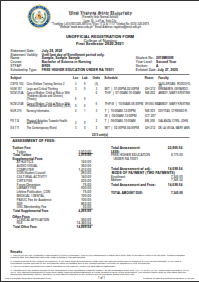
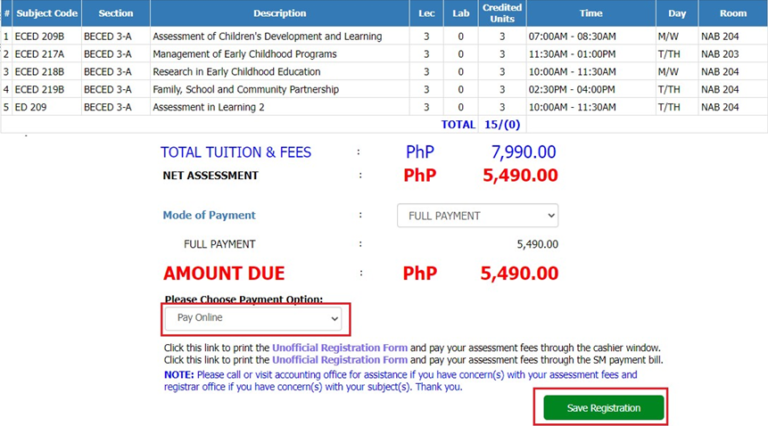
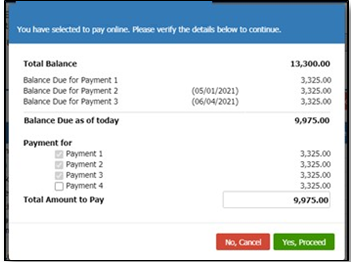
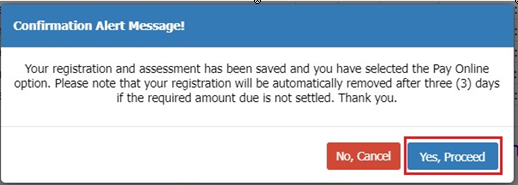
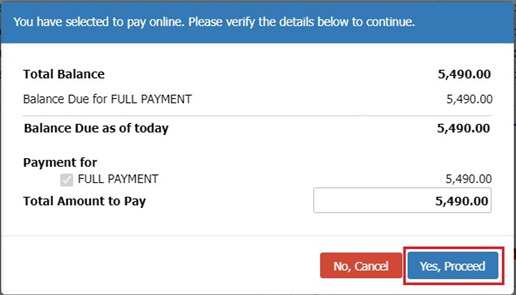
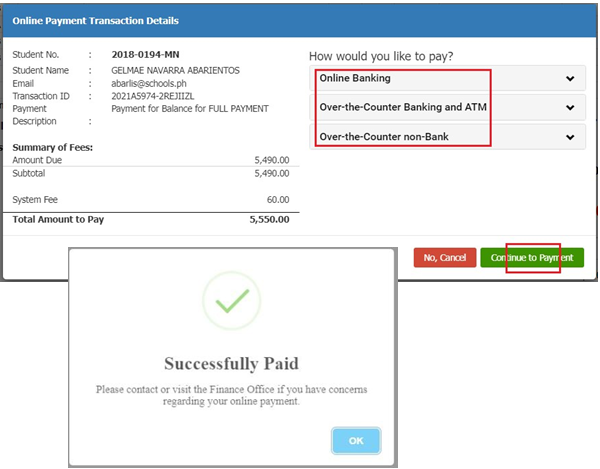
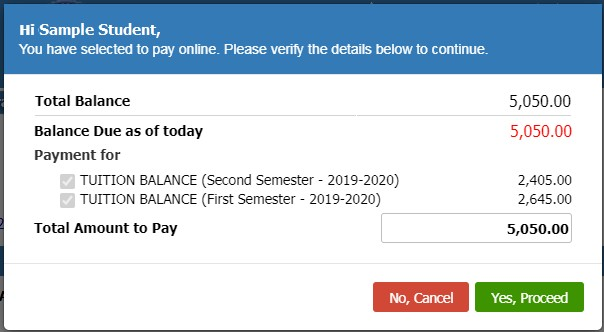
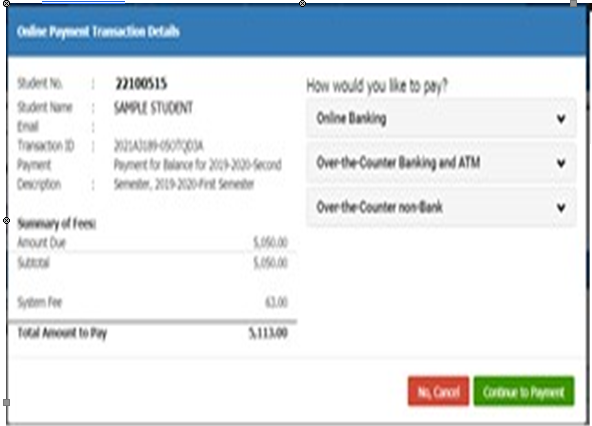
  • General Procedures for Payment of School Fees

    To cater both students residing within and outside of Iloilo, the West Visayas State University Main Campus offers multiple payment options for efficient and secured payment procedure for its students. Given below are the different modes of payment offered by the University.

    How to Pay School Fees:

            Please choose a payment procedure most convenient for you. the University.

    Payment at the Cash Office, WVSU Admin. Bldg., Luna St., La Paz Iloilo City

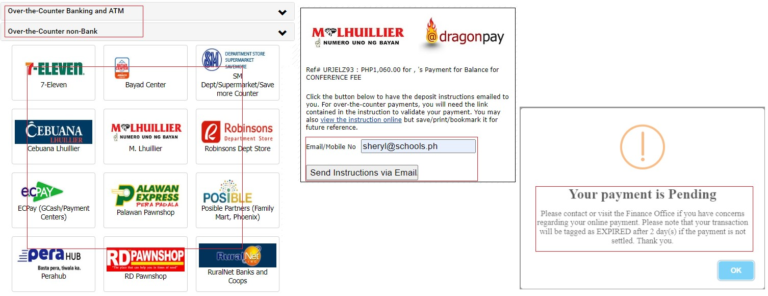
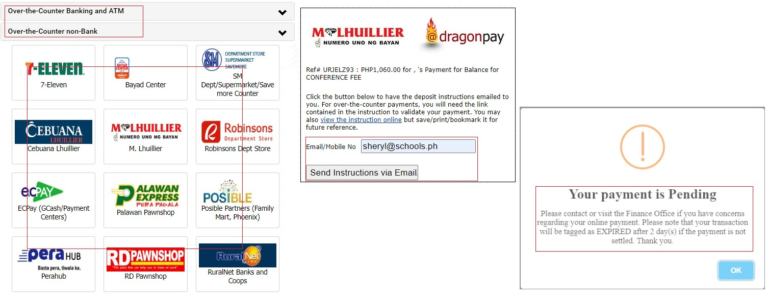
    Payment through Other Channels

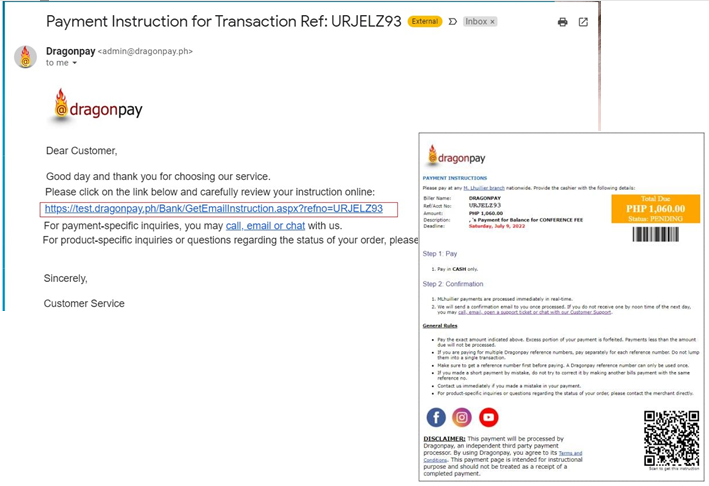
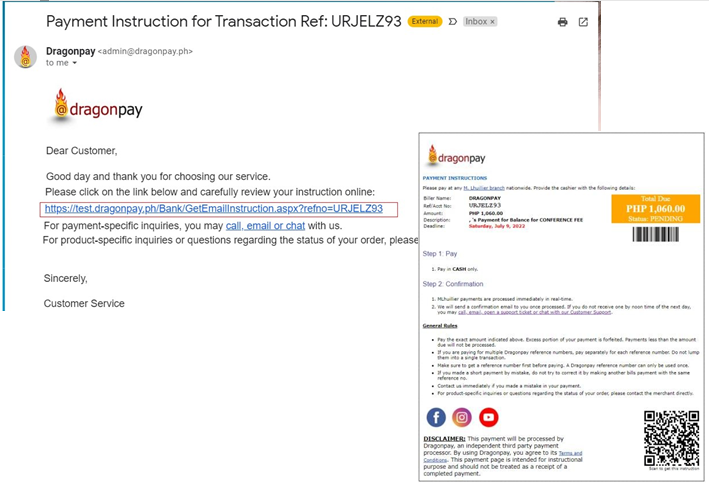
    1.2 Open your email and click the link to download the instruction on how to process your payment.

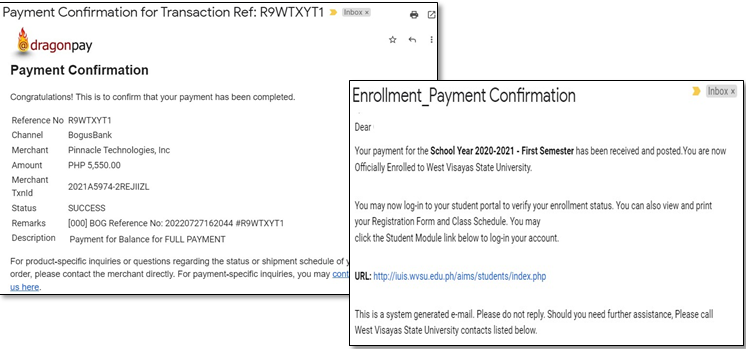
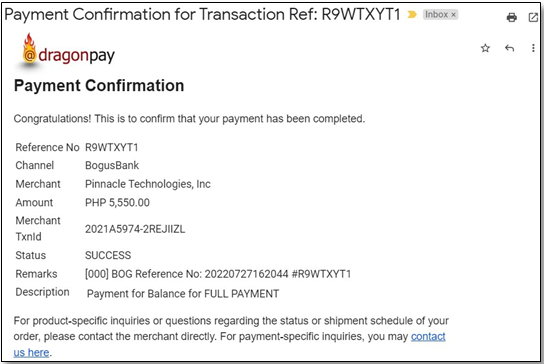
    1.3 Open you email again to check/view your payment confirmation once you have processed the payment successfully.

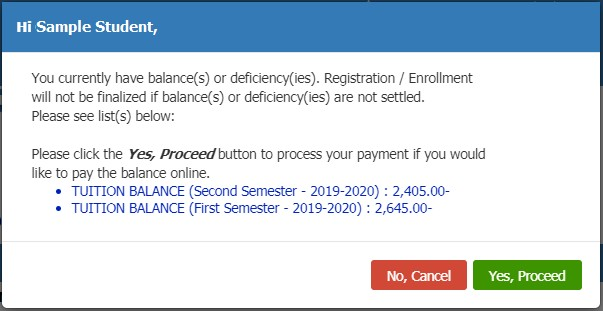
    How to Pay Previous Balance(s)

    1.8 Open your email to check or view your payment confirmation.

    •  Once your payment is successful, you will receive an email regarding your payment confirmation.

    1.4 Enter your email address. The payment gateway will send the instruction to the provided email address. You will be notified on the status of your payment until you have processed it successfully.


    Click here to view Schedule of Fees

    For inquiries, please call 320-0870 to 78 loc. 1142, 1116 or 1117.

  • Guidelines for Faculty Evaluation

    To all Students enrolled in Undergraduate and Graduate Level last Second Semester, SY2019-2020:

    May we request you to evaluate your teachers for the said semester before this year ends for us to continuously improve our services. All your responses will be treated with confidentiality.

    [googlepdf url=”https://wrif.wvsu.edu.ph/files/pdf/memo-main/wvsu-memo_20-116.pdf” download=”Download” width=”100%” height=”600″]

  • The Official Statement of the West Visayas State University

    [googlepdf url=”https://wrif.wvsu.edu.ph/files/pdf/cilpibulletin2.pdf” download=”Download” width=”100%” height=”600″]